 Search Tips
Why can't I access a menu item in the Treeview?
Menu access is managed by a user's security role, which may not include access to specific menu items. To assign menu access to a role, use the Assign Roles to Programs screen. Enter/select "MNU" as the application code to view the available menus, select the required menu, then insert the role that requires access to the menu, as shown in the screenshot below.
NOTE: Once a role is added to a program, access is granted only to that specific role. For more information, refer to System Data - Assign Roles to Programs.
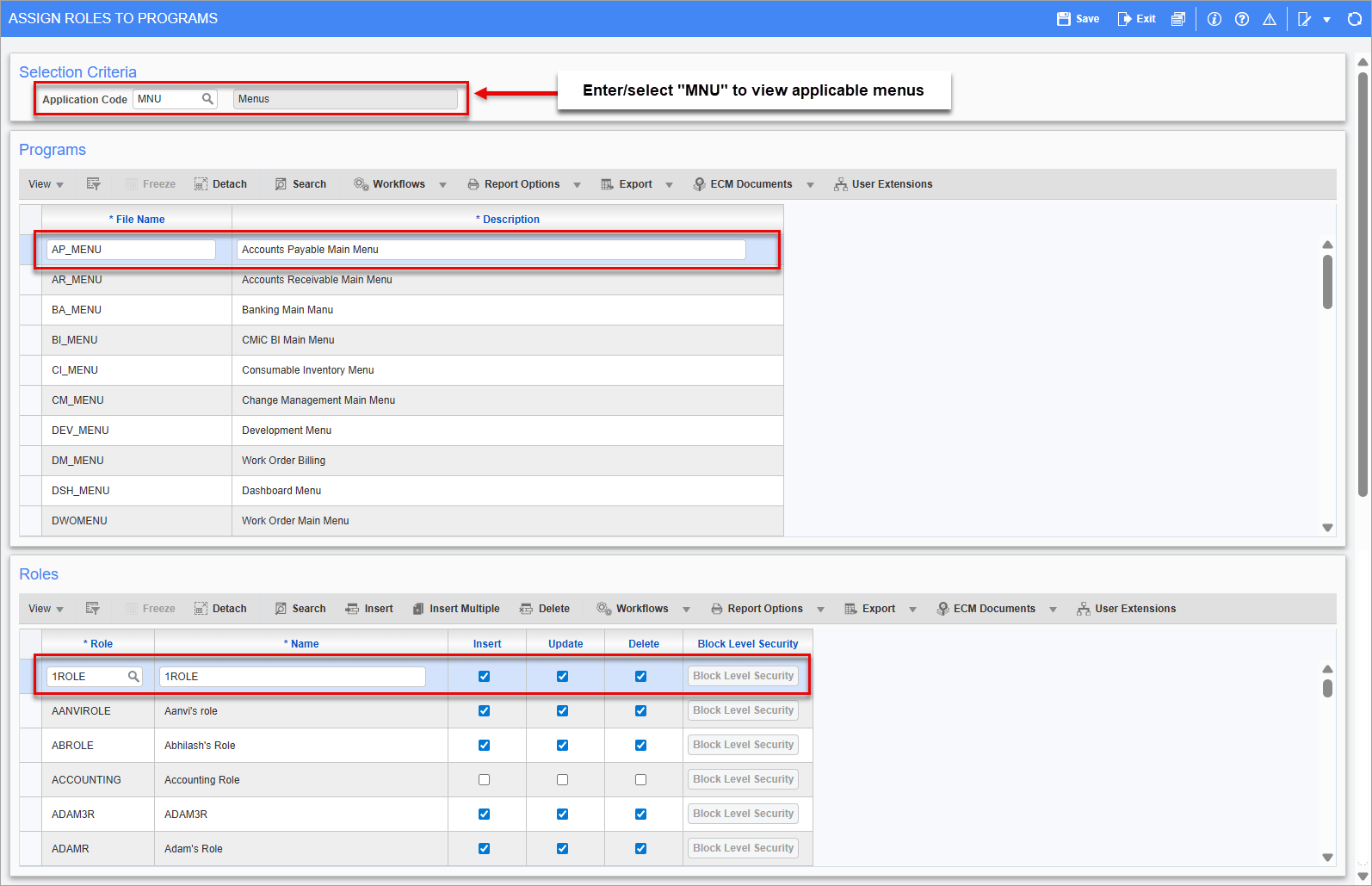
Pgm: FORMROLE – Assign Roles to Programs; standard Treeview path: System > Security > Roles > Assign Roles to Programs
I received the error message, "Error converting units of measure from [Unit of Measure] to [Unit of Measure] for Job [Job Code] Cost Code [Cost Code] and Category [Category Code], cannot post. Please check Job Costing Setup. (CMC-041)".
Navigate to the Weight Measure screen under the Global Tables menu of the System Data module to add weight measure conversions as needed. For more information, refer to System Data - Weight Measure.