 Search Tips
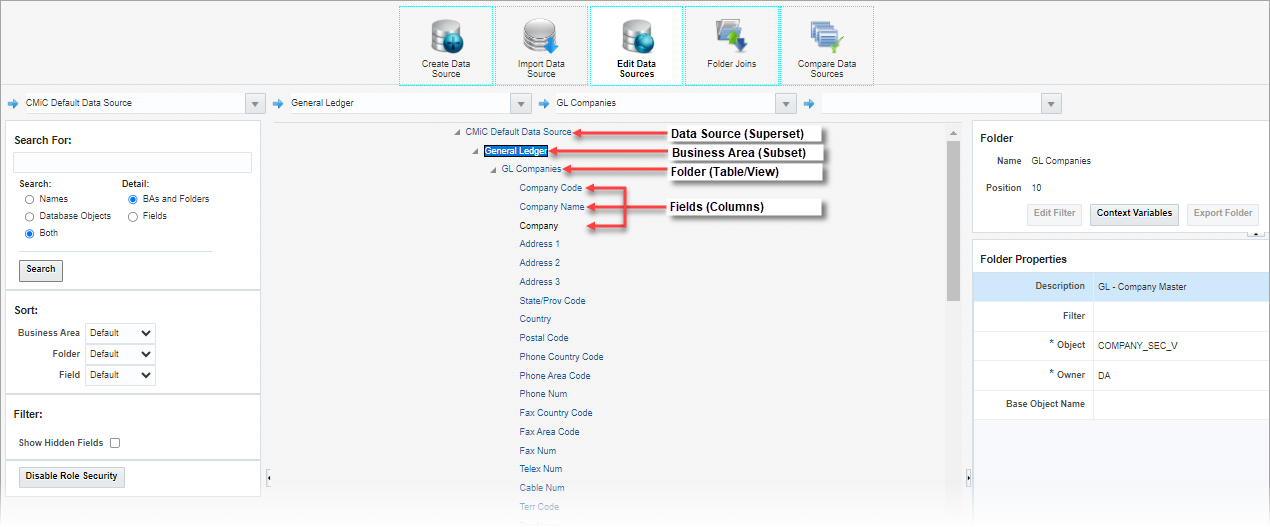
The CMiC Default Data Source is made up of business areas, folders, and fields.
Data Source (Superset of Database Objects)
In BI Catalog Builder, a data source is a master set of database objects (i.e., tables, views) that have been logically organized into subsets referred to as business areas.
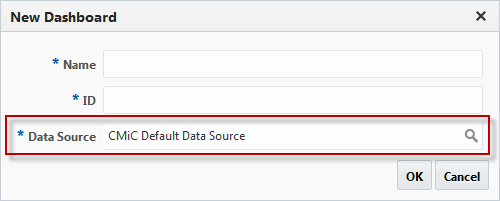
Pop-up window launched when creating a new dashboard in BI Dashboard Builder tool
In BI Dashboard Builder, a data source is selected when creating a new dashboard (as shown above), and its folders (i.e., tables/views), and the results (rows) returned by their joins are used to create the dashboard’s visualizations (i.e., charts, gauges, tables).
Business Area (Subset of Data Source)
A business area is a subset of the data source that contains a logical grouping of tables/views (i.e., folders) pertinent to a dashboard to be created in BI Dashboard Builder.
To learn more, refer to BI Catalog Builder - Business Areas and Folders.
Folder (Table/View)
A folder is a single table or view, which contains rows of records comprised of fields (i.e., columns).
To learn more, refer to BI Catalog Builder - Business Areas and Folders.
Field (Column in Row of Table/View)
For a table or view’s row, its data is stored in fields (i.e., columns).