 Search Tips
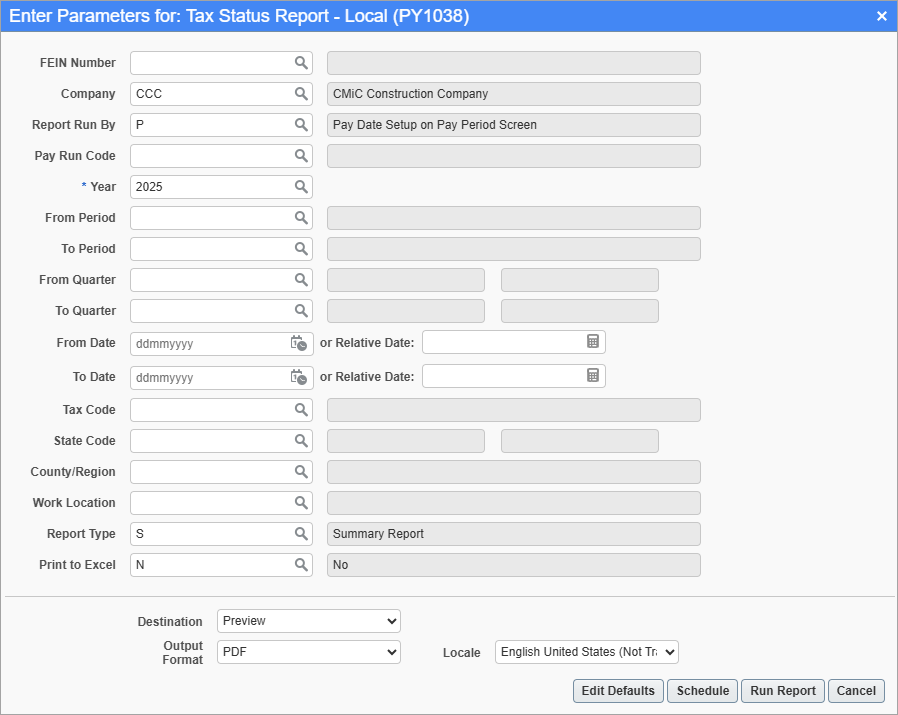
Pgm: PY1038 – Tax Status Report – Local; standard Treeview path: US Payroll > Reports > Tax Reports > Tax Status Report – Local
This screen is used to generate the Local Tax Status Report for the specific year, pay periods, quarters, and date ranges in companies. The report includes gross taxable wages and local withheld taxes for the selected work locations.
NOTE: Federal, state, and local taxes must first be set up in order to use this screen. For more information, refer to US Payroll - Payroll Taxes - Overview.
Users can print the report for a specific company code or FEIN (Federal Employer Identification Number). FEINS are maintained in the FEIN Maintenance screen.
Report Run By
Enter/select one of the following codes from the Report Run By LOV to customize the report:
-
O: Actual Posting Dates to GL/JC
-
P: Pay Date Setup on Pay Period Screen
-
Q: Quarterly – Defined by Month on Pay Period Screen
-
R: Pay Period
-
C:Check Date
Relative Date
Select a substitution value expression for a relative date, such as the start of the week or the end of the quarter.
The report can be further filtered by Tax Code, State Code, County/Region, and Work Location.
Report Type
Enter/select "S" to print a Summary Report or "D" to print a Detail Report.
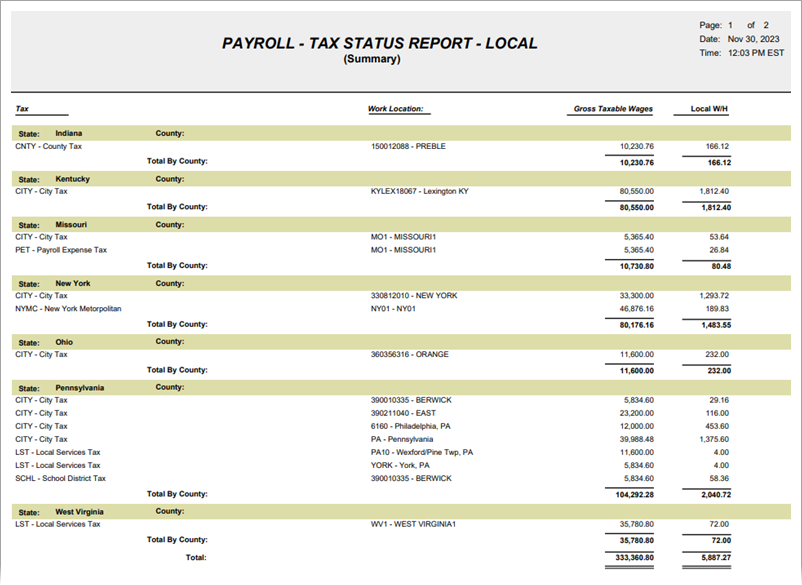
Sample Local Tax Status Report (Summary) (PY1038)