 Search Tips
Why is it Useful?
As part of the Nexus release, CMiC introduces AI agents designed to simplify day-to-day work and boost productivity. Task Agents help perform actions on your behalf, while Query Agents provide answers directly from your data (see AI & Analytics - Getting Started with Task Agents to learn about these agents in more detail). By automatically surfacing the most relevant agents based on your current screen, Nexus delivers AI assistance that feels immediate, intuitive, and seamlessly integrated into the system.
NOTE: This feature is available in Nexus 01.
How Does it Work?
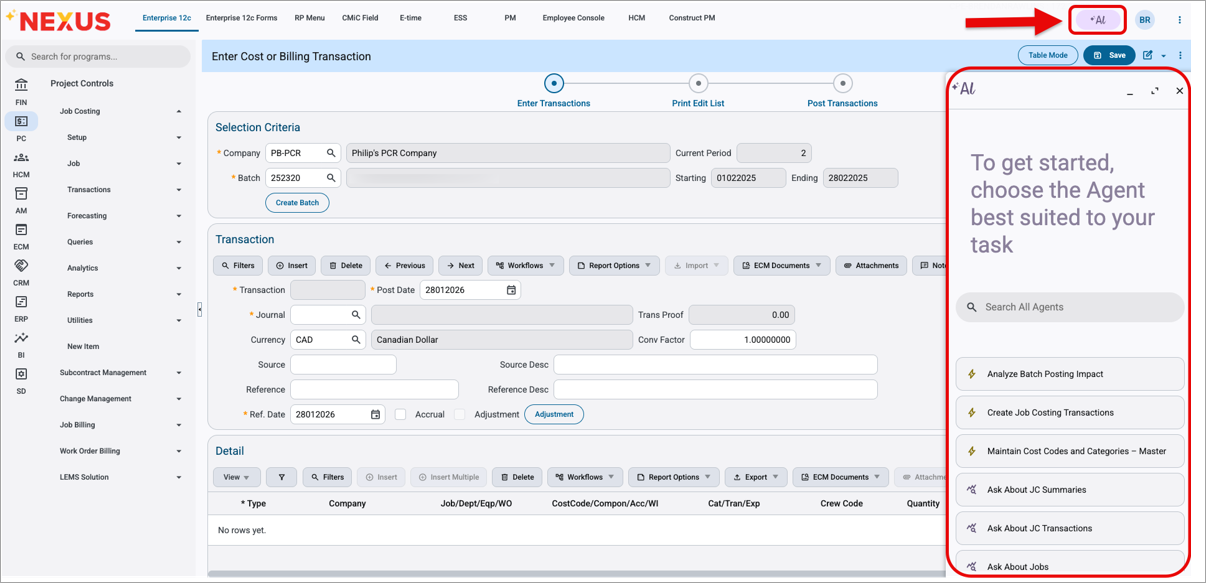
AI Sidesheet
The new AI sidesheet opens when you click the [Al] button in the top-right corner of the new Nexus console. By default, it displays only the AI agents relevant to the screen you are currently on. Users can also search for and access all available agents at any time, regardless of location, without navigating away from their work.
To learn more about some of the latest features being released, return to Nexus 01 Highlights.