 Search Tips
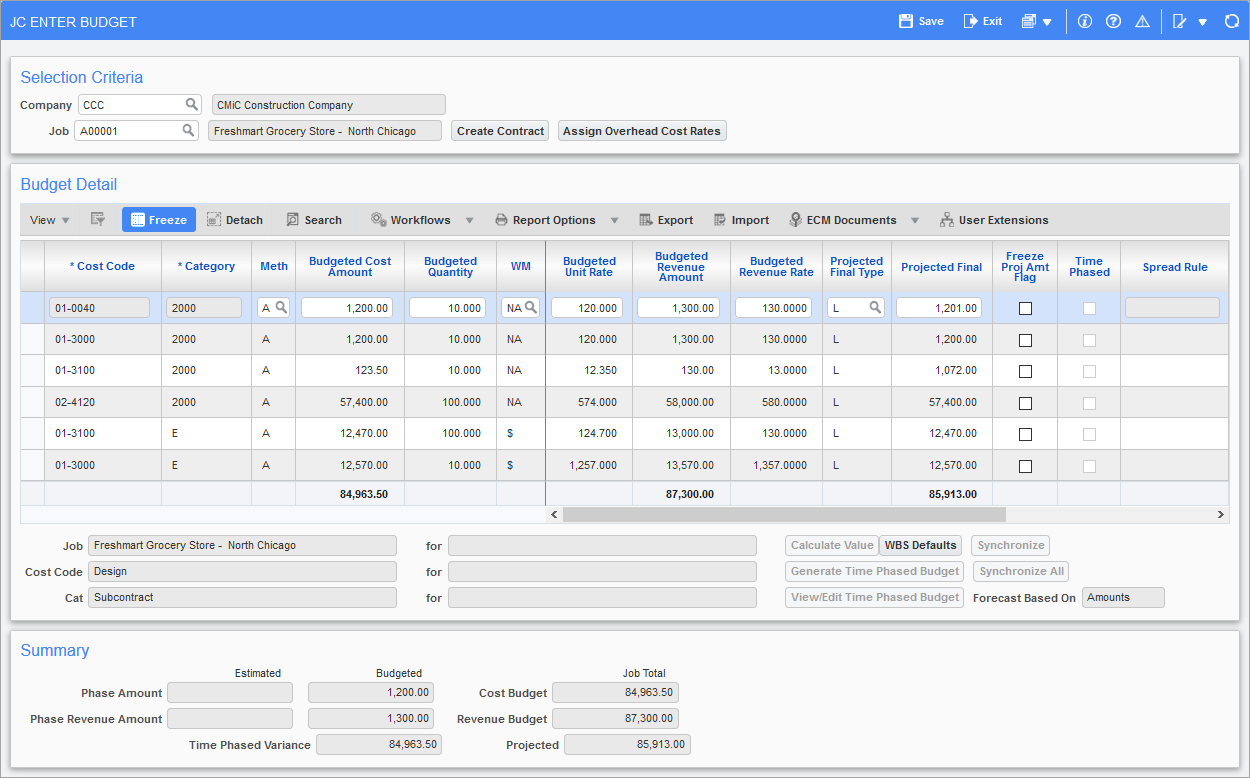
Pgm: JCBUDGET – Job Budget Entry/Edit; standard Treeview path: Job Costing > Job > Enter Budget
Also known as the Job Budget Maintenance screen, this is where you enter the budgets for the cost elements on the job. Budgets entered here are considered the original budget and can be modified as long as the job has not been started. While the job is still pending, budgeted amounts displayed in this screen are a combination of originally entered budget amounts and any posted change order amounts (EXT/INT/TRN) written against the job/cost code/category.
[Create Contract] − Button
This screen also simplifies creating a Job Billing contract through the use of the [Create Contract] button. The contract can then be edited in the Job Billing module. For further details, see Job Billing - Creating a Billing Contract.
[Assign Overhead Cost Rates] − Button
Users can also assign overhead rates by clicking the [Assign Overhead Cost Rates] button, which opens the Assign Overhead Cost Rates pop-up window. For further details, see Job Costing - Assign Overhead Cost Rates.
Once the job is in progress, the original budget becomes frozen, and budget changes are then entered via change orders.
NOTE: If a job has already been started and changes need to be made to its budget, the Revise Budget screen on the Utilities sub-menu can be used. For further details, see Job Costing - Revise Budget.
Budgeted amounts are entered at the lowest level of cost detail and can be entered in dollars or in units. If units are used, a rate per unit is also required so the system can determine the dollar amount of the budget for that cost.
The screen will automatically display all cost elements for the job. Cost elements are the lowest combination of cost codes and categories where the category type allows budgeting. For each cost code/category combination, a budget amount or unit quantity can be specified.
For further details on the rest of the fields available on this screen, see Budget Detail.