 Search Tips
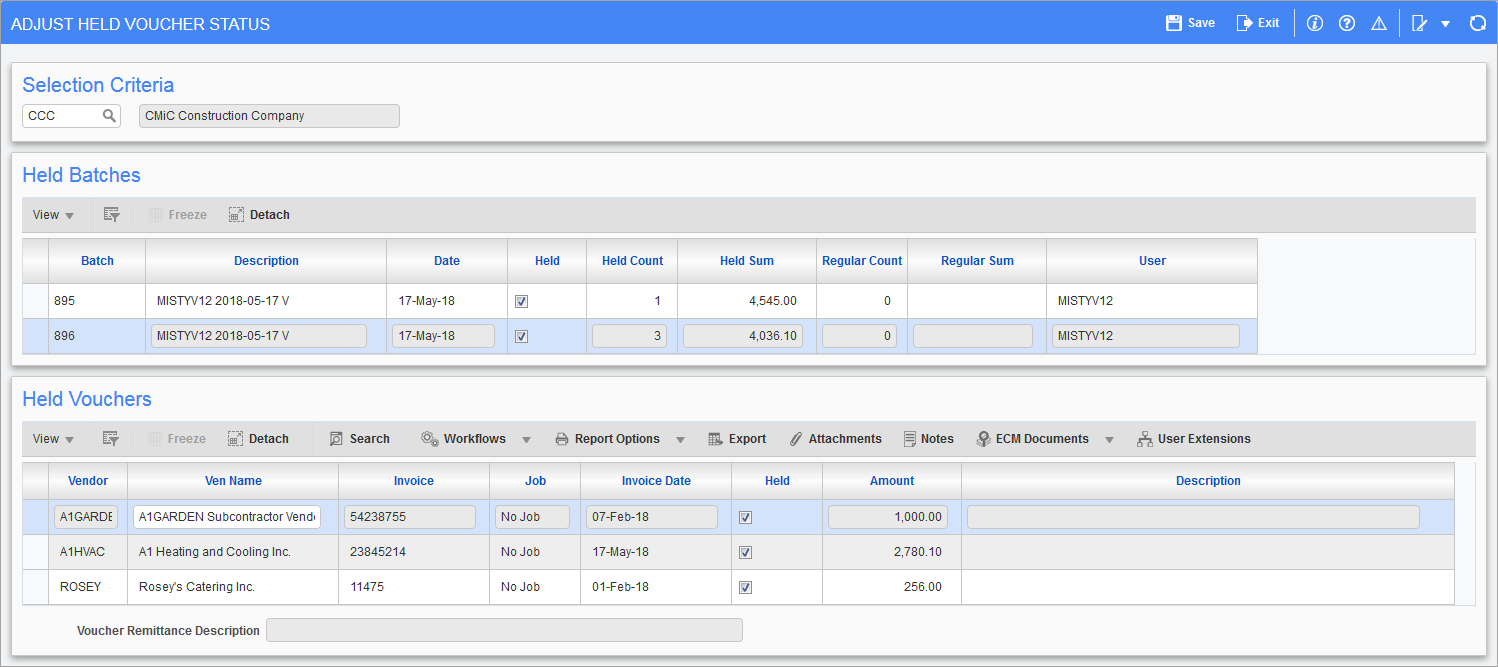
Pgm: APVOUSTJ – Adjust Held Voucher Status; standard Treeview path: Accounts Payable > Payment > Adjust Held Voucher Status
The Adjust Held Voucher Status screen is used to release vouchers with a hold status set to “True”, which may have occurred due to one of the following situations:
-
The ‘Hold All New AP Vouchers’ box is checked on the Voucher tab of the AP Control File, which causes the ‘Hold Voucher’ box to be checked by default on the Defaults tab of the Enter Voucher screen.
-
During Voucher Entry, the ‘Hold Voucher’ checkbox on the Defaults tab of the Enter Voucher screen was manually checked for the vouchers.
-
RFPs corresponding to the vouchers had their ‘On Hold’ box checked manually, or automatically due to the ‘Hold All New SC Pay Requests’ box being checked on the RFP Defaults tab of the SC Control File ( standard Treeview path: Subcontract Management > Local Tables > Control).
For payment to occur, vouchers posted with the hold must first be released through this screen, which lists held vouchers by batches, or be released through the Deferred Vouchers tab of the Adjust Voucher Status screen.
The Held Batches section lists batches containing held vouchers, and the Held Vouchers section lists the vouchers in the batch selected in the Held Batches section.
Do not confuse the hold status with the standard payment statuses of “Normal (N)”, “Temporarily Deferred (T)”, “Permanently Deferred (P)”, and “Express (E)”.
A user’s ‘APVOUHLD’ system privilege, assigned to their user ID or security role, determines if the user is able to modify this hold status.
Selection
Company
Enter/select the company code.
Held Batches
This section lists batches containing held vouchers and is used to release all held vouchers in a held batch.
Batch, Description, Date
These fields are read-only and display the batch number, name, and date.
Held – Checkbox
Uncheck this box to release the held batch. This will release the hold on all vouchers in the selected batch.
Held Count
This field is read-only and displays the number of held vouchers in the batch. These vouchers can be viewed in the Held Vouchers section.
Held Sum
This field is read-only and displays the total sum of the held voucher amounts.
Regular Count
This field is read-only and displays the number of regular vouchers (i.e., non-held vouchers) in the batch.
Regular Sum
This field is read-only and displays the total sum of the regular voucher amounts.
User
This field is read-only and displays the user ID or security role who created the batch.
Held Vouchers
This section lists the vouchers in the batch selected in the Held Batches section and is used to release individual vouchers in a batch .
Vendor
This field is read-only and displays the vendor code.
Ven Name
This field can be used to update the vendor's name if the vendor is a one-time vendor. For more information, please refer to Accounts Payable - Maintain Vendors - Vendors - Tab.
Invoice, Invoice Date
These fields are read-only and display the invoice number and invoice date.
Job
This field is read-only and displays the job code. If there is no job distribution for the voucher, this field will display "No Job".
Held – Checkbox
Uncheck this box to release the voucher.
Amount
This field is read-only and displays the voucher amount.
Description
This field is read-only and displays the voucher description entered when the voucher was created. The Description field is available on multiple voucher entry screens. This description will be printed on the check unless a remittance description is entered.
Voucher Remittance Description
This field is read-only and displays the voucher remittance description entered when the voucher was created or adjusted. The Remittance field is available on multiple voucher entry screens, and the Remittance Description field is available on the Accounts Payable - Adjust Voucher Status. The remittance description replaces the Description field on checks.