 Search Tips
Patching
NOTE: In these instructions, it is assumed that a patch is being applied into the PROD environment. If it is being applied in a different environment, change PROD (or prod) to TEST (or test).
CMiC patches must be installed on every application server that has a midtier or midtierjsp installation. Normally every application server has a midtier or a midtierjsp installation, or both. The only exception to this is if there is a stand-alone infrastructure server. A stand-alone infrastructure server only has an infra installation. The rule is: if there are more than one application servers, CMiC patches must be installed on every application server, except any stand-alone infrastructure server.
When a patch is installed on the first application server, the patch installation program will recognize that the database has not been updated yet, and it will run the database upgrade scripts as part of the patch installation process. When the same patch is installed on the subsequent servers, the patch installation program will recognize that the database is already up to date, and it will not run the database upgrade scripts again. This means that applying the patch on the subsequent servers will take less time (possibly significantly less time) than running it on the first server.
It is very important to run the patch installation program on each server. This is because the patch installation program does more than just copy files – it also updates configuration files on the server. The only way to properly install a patch is to run the patch installation program on every server.
A CMiC patch is not fully installed until it has been installed on all application servers, and the JSP programs have been deployed for that patch on every application server that has a midtierjsp installation.
If more than one patch is being installed at the same time, the recommended methodology is to install the first patch on every application server, then install the second patch on every application server, etc.
Here are the steps to follow:
-
Download the patch from CMIC to the patches folder.
-
Run the .exe file and follow the prompts to extract the patch.
-
Open a DOS window from the patches folder e.g. D:\Patches\V10-014\v10patchinstall
-
Enter:
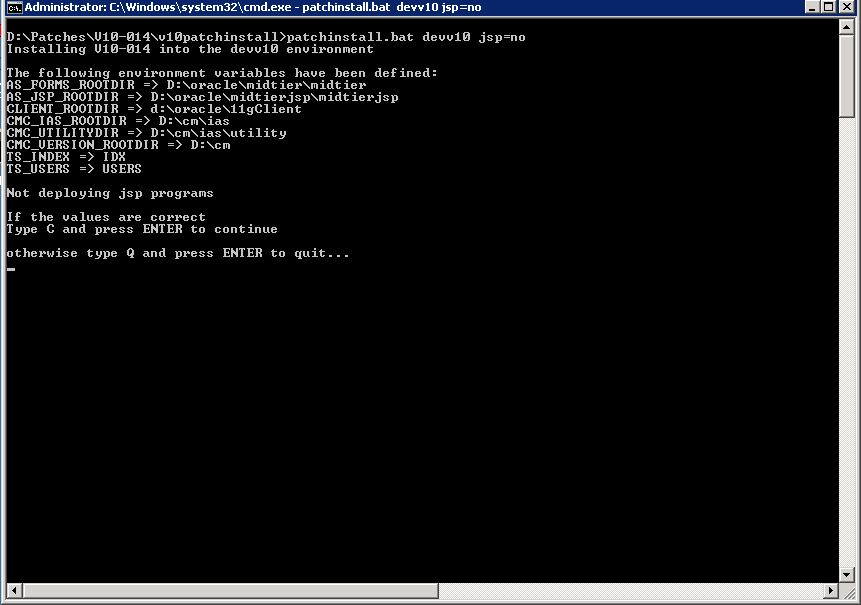
CopyD:\Patches\V12-012-2c\v12patchinstall>patchinstall.bat test JSP=no
This command says we are not deploying JSPs with the patch. The default action is to deploy JSPs.
-
If the information displayed is correct, then enter “c” otherwise “q”.
-
The patch will run and at the end will display:
CopyV12patchinstall.pl finished. Be sure to check the file V12-012_patch_install_log.txt for any error messages. Also please check the d:\cm\v12\prod\saved\V12-012-2 directory for any newer files that were found.
Please email SendToCMiC_salesV12_V12-012-2_prod.txt to patchlogs@cmic.ca for verification. -
The file to email is located in a path similar to this:
D:\cm\ias\utility\patchinstall\logs\V12-012-2\<env>\2020-10-10--16-40-51
-
After a successful patch installation, a file will be created in the following:
D:\cm\ias\utility\patchinstall\successful_installs\env
-
Install the patch on all CMIC application servers that contain a midtier or midtierjsp. CMIC patches are not applied to the infrastructure server.
-
After the JSPs have been deployed, log in to CMIC as DA and test the application.