Search Tips
This
Enterprise
The About screen, preferably the program specific one, can be used to check version information in Enterprise. If that is not available, the console version of the About screen can be used, as highlighted in the screenshot below.

CMiC Field
The version.jsp of the specific program can be used to check version information in CMiC Field. If that is not available, the version.jsp of the SdMenu can be used instead.
NOTE: The link to the version.txt is available on both.
-
From the specific program, right click on the screen and select one of the following options depending on your browser:
-
View frame source (Edge/Chrome)

-
This Frame > View Frame Source (Firefox)

-
-
From there, note the context-root of the resulting URL:

-
Follow the steps below to create the URL for the version.jsp:
-
Take the URL when accessing CMiC Field.

-
Remove all the text after the Base URL and the environment version:

-
Add the context-root along with "/version.jsp" to the end of the URL, as shown in the screenshot below, then hit enter:


-
-
If the program specific version is not available, you may gather this information for the SdMenu instead. Begin by going to the Application Selector screen:

-
Following that, please remove all the text after "SdMenu/":

-
Finally, add "version.jsp" to the end of the URL and enter it:


Construct Apps
The version information can be accessed from CMiC Construct apps (mobile or web versions) by clicking the Menu icon in the top left corner, click the Settings icon, and then expand the About section.
NOTE: If the About section is not available in any particular Construct application, you may also retrieve the version information by using the following URL structure:
https://{CMiC domain}/{CMiC server}/{Mobile app}/version.json
For example, you can find the version of Construct PM for NOVA PROD using the following URL:
https://nova.cmiccloud.com/cmicprod/construct-pm/version.json



If you are working on a CMiC Mobile App, please also check the OS version of your device. For further details, see:
-
Find the software version on your iPhone, iPad, or iPod touch (Apple Support)
-
Check & update your Android version (Android Support)
CMiC BI
To check the CMiC BI version information, navigate to either Dashboard Builder or Query Builder and select File > About from the toolbar.


Jasper (PaaS Customers Only)
This is only obtainable for PaaS customers. Enter the Jasper Repository and select the 'About JasperReports Server' link at the bottom left corner of the page.

CMiC APIs
Each CMiC endpoint rolls up into a container. The containers mimic CMiC product applications. The following describes how to look up version information on file by resource container.
To validate the container version installed on the CMiC API Server instance, append the endpoint name with "/version". In the following example, we want to check the version for this URL: https://{add CMiC domain}/{add CMiC server}/hcm-rest-api/rest/1/pyemployee.
In the example above the container is represented by hcm-rest-api/rest/1 and the endpoint is /pyemployee.
To check the version on this endpoint, remove the "/pyemployee" from the URL and replace it with "/version", then run the GET method to retrieve the version installed.
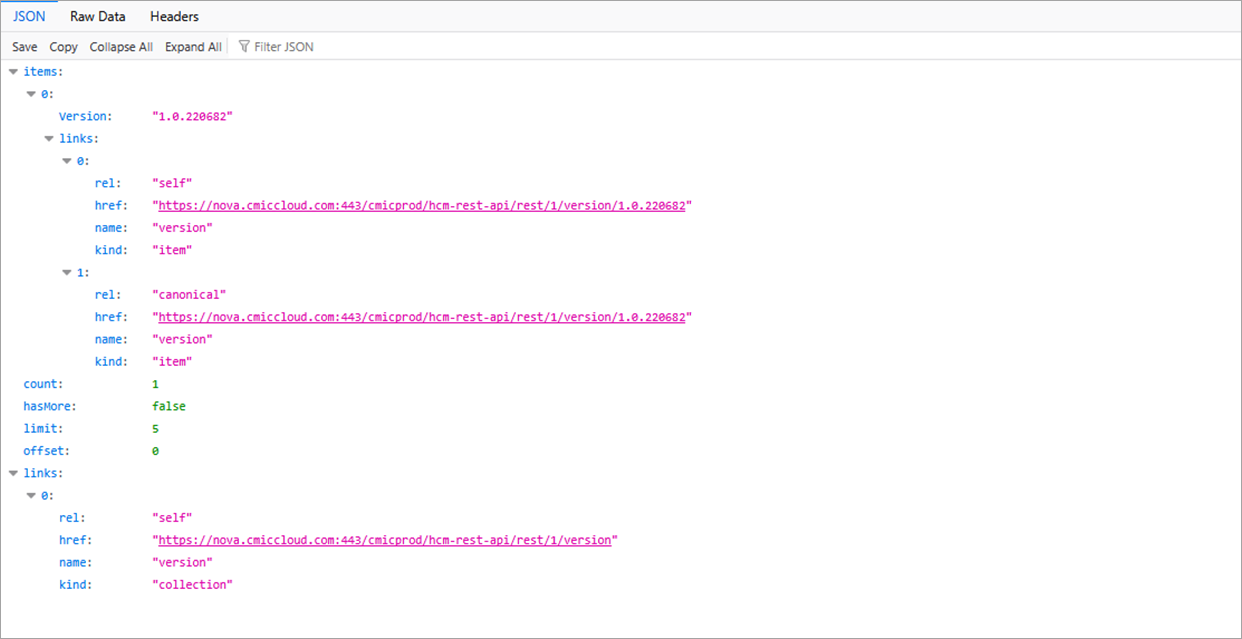
The URL will be https://{add CMiC domain}/{add CMiC server}/hcm-rest-api/rest/1/version.
The following screenshot is an example for https://nova.cmiccloud.com/cmicprod/hcm-rest-api/rest/1/version.