 Search Tips
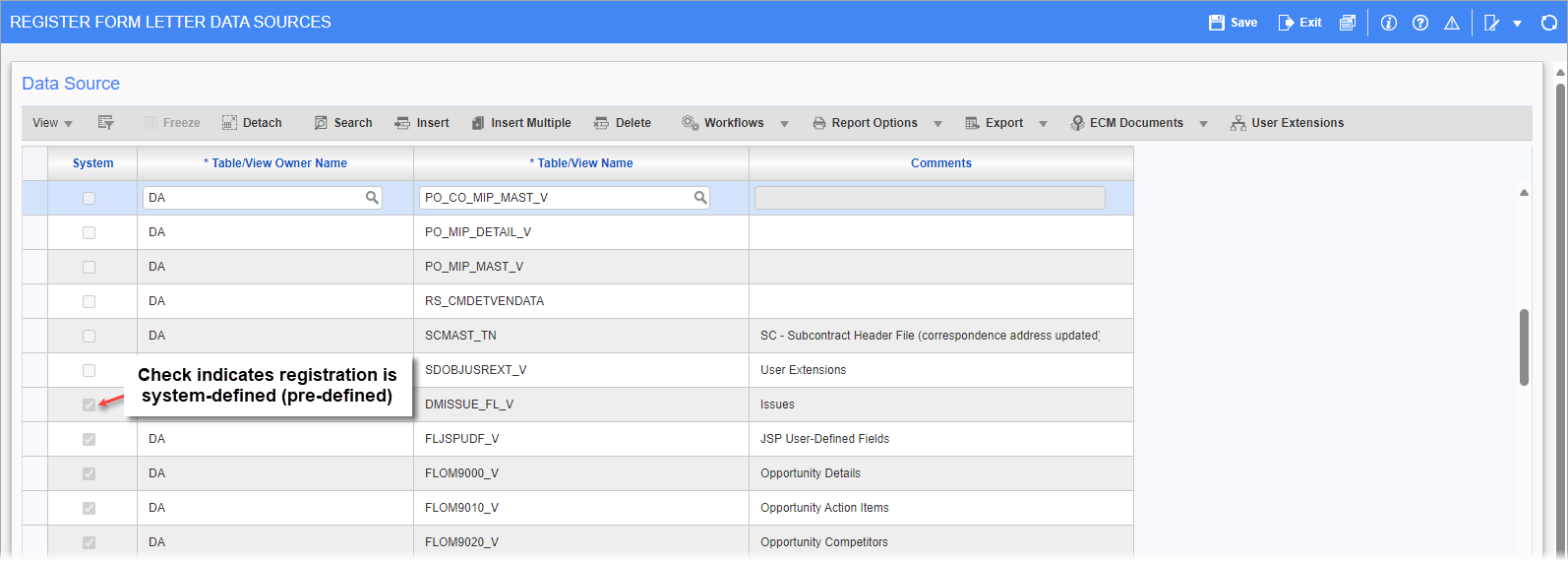
Pgm: SYSDREG - Register Form Letter Data Sources; standard Treeview path: System > Forms > Register Data Sources
If a data source is needed to be used in a MIP Word document that has not yet been registered in the system, use the Register Data Sources screen to do so. By default, when the system is initially installed, only the data sources that are used by standard CMiC form letters are registered.
Data sources are Enterprise tables or views that an administrator has made available through this registration process for the purpose of designing MIP Word documents, or forms letters.
As shown in the above screenshot, a checkmark under the System column indicates that the registered data source is system-defined (pre-defined). Registered data sources that are system-defined are not editable, as that could cause any standard form letters that use them to stop functioning.
A new data source is registered by inserting a row in the table. Enter/select the owner of the data source in the Table/View Owner Name column, and then enter/select the relevant table or view from the Table/View Name column. Next, click the [Show Columns] button to ensure that all necessary columns of the data source’s table or view are available for MIP Word documents. See the Register Data Source to Use in MIP Word Document section in the Microsoft Integration Package guide for more details.