 Search Tips
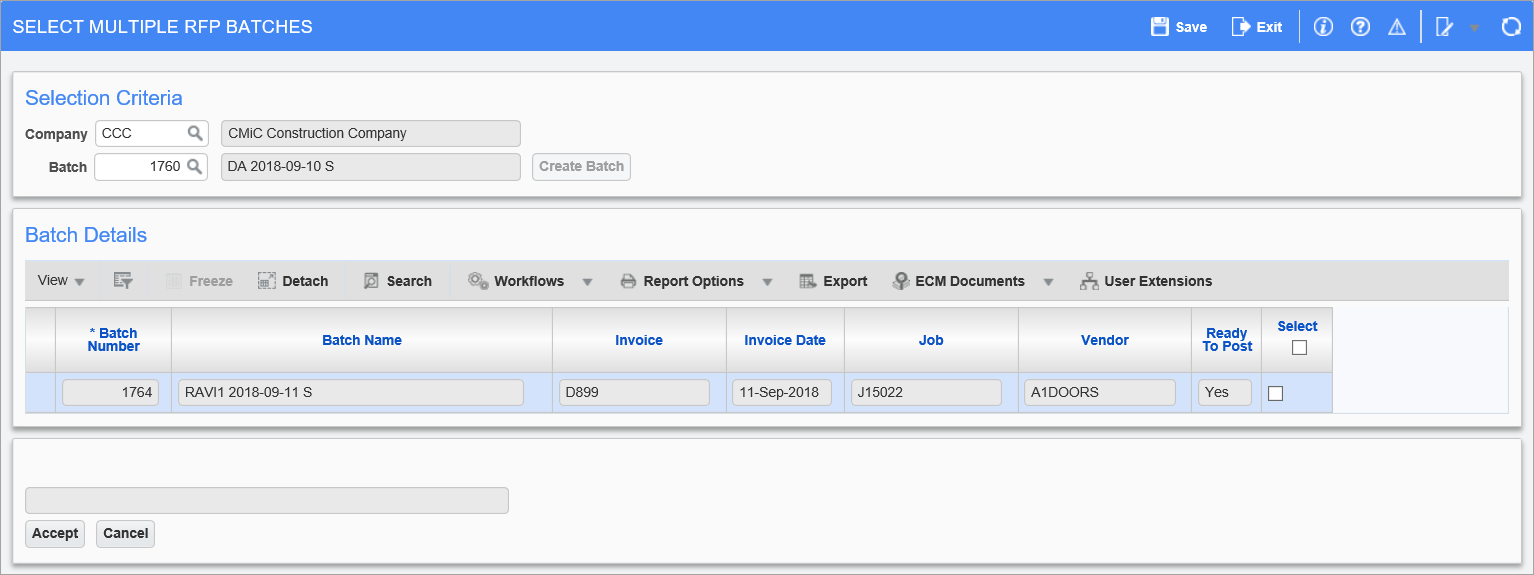
Pgm: SCSELMULTBCH – Multiple RFP Batch Selection; standard Treeview path: Subcontract Management > Payments > Select Multiple RFP Batches
This screen is used to move RFPs (invoices) from other batches into the batch selected via the Batch field.
NOTE: Care must be taken when using this option, since once RFPs are assigned to a different batch, they cannot be reassigned to their original batches. Also, the original batches are marked “Closed” and can no longer be accessed individually.
Company
Select relevant company for batch.
Batch
This field is automatically set to the user’s last unposted batch. Its LOV is populated with the user’s unposted batches, and if the user has the security privilege to see other users’ batches, it is also populated with all unposted batches for the company.
The display-only field to the right of this field displays the batch’s name, which is composed of three parts: user’s name, current date, and batch type code (single letter – “S” indicates that batch contains Subcontract RFPs, which are Vouchers against Subcontracts in Accounts Payable module).
[Create Batch] – Button
To enable this button for the creation of a new batch, clear the Batch field and tab or click away from it. This causes the [Create Batch] button to become enabled. Click it to create a new batch and to have its automatically generated number put into the Batch field. Also, when a batch is created, it is associated to the user, assigned a batch type code, and a batch name is automatically generated for it.
[Accept] – Button
Click to move RFPs (invoices) selected via ‘Select’ checkboxes to batch selected via Batch field.