 Search Tips
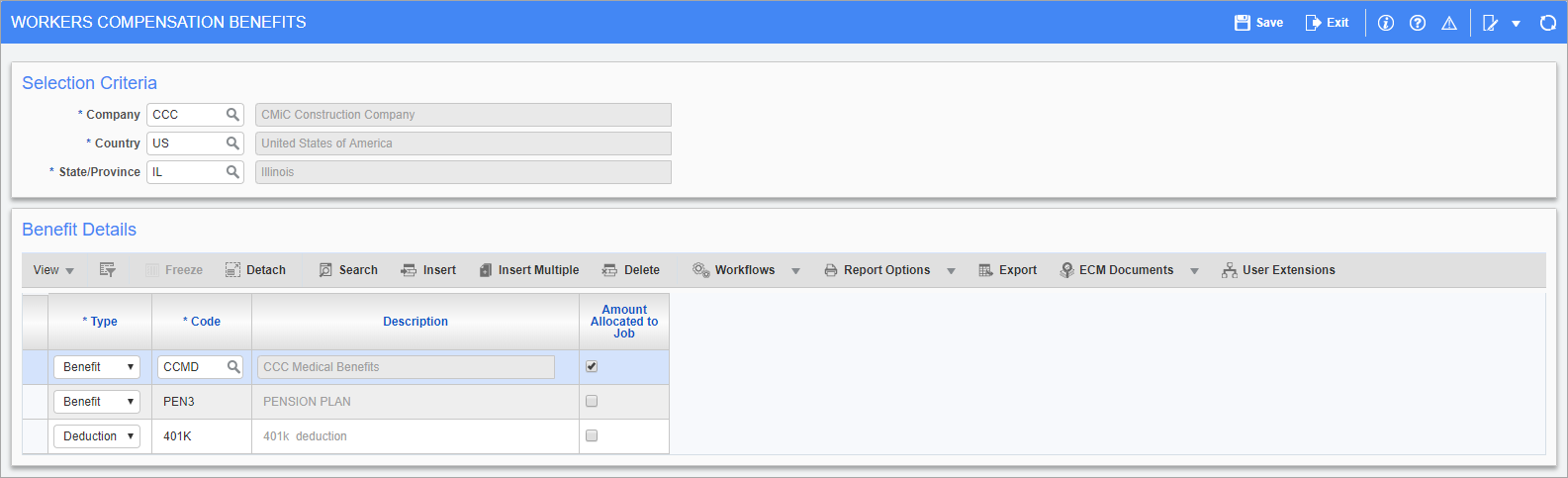
Pgm: PYWCBBEN – Workers’ Compensation Benefit; standard Treeview path: US Payroll > Administration > Worker Compensation > Benefits
Workers’ compensation can be calculated on wages, benefits, and deductions. This screen allows for the selection of benefits and deductions and the allocation of calculated benefit/deduction amounts to jobs.
Selection Criteria
Company, Country, State/Province
Enter/select the company, country, and state codes for the benefit.
Benefit Details
Type
Select whether the burden is a benefit or a deduction.
Code
Enter/select the benefit or deduction code.
Amount Allocated to Job – Checkbox
Check this box to have the dollar amount calculated on the benefit or deduction allocated to the job cost.
When checked, benefits and bonuses will be included in taxable gross payroll calculations, which can be viewed in the Gross Earnings field on the US Payroll - Mid-Year Pay History Setup screen and in the Taxable Gross Payroll column on the US Payroll - Workmen Compensation Premiums Due By Job report. As well, users can view the WCB code for the associated BW and BN transactions on the WCB Code field on the US Payroll - Mid Year Pay History Log.