 Search Tips
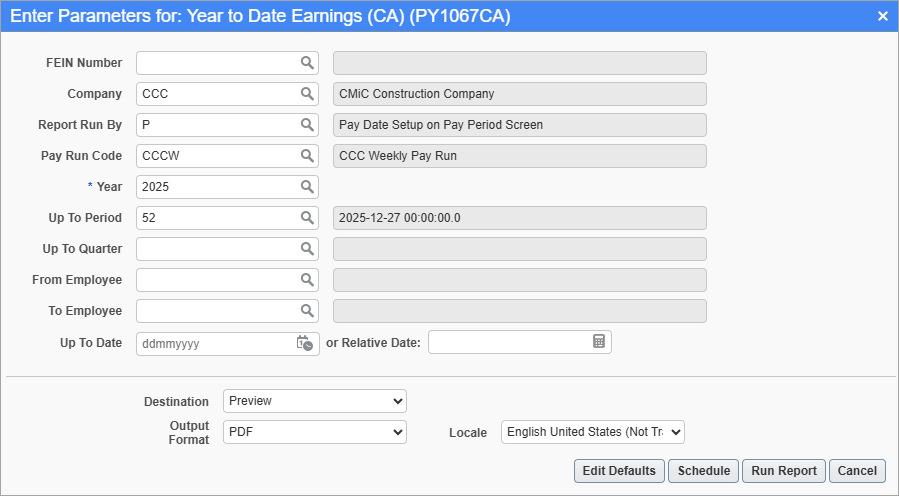
Pgm: PY1067CA– Year-To-Date Earnings (CA); standard Treeview path: International Payroll > Reports > Payroll Reports > Year-To-Date Earnings (CA)
This screen is used to generate the Year-To-Date Earnings Report for a specific year and pay periods in companies. The report includes employee personally identifiable information (PII) and a breakdown of the federal and provincial/local year-to-date earnings and withheld taxes for selected employees.
NOTE: Payroll must be processed and posted prior to using this screen. As well, payroll configurations and pay runs must first be set up in order to use this screen. For more information, refer to US Payroll - Company.
Report Run By
Enter/select one of the following codes from the Report Run By field’s LOV to customize the report:
-
O: Actual Posting Dates to GL/JC
-
P: Pay Date Setup on Pay Period Screen
-
Q: Quarterly – Defined by Month on Pay Period Screen
-
R: Pay Period
Up To Period, Up to Quarter, Up To Date
Enter/select an ending date for the range of dates to include on the report. Leave these fields blank to include the whole year on the report.
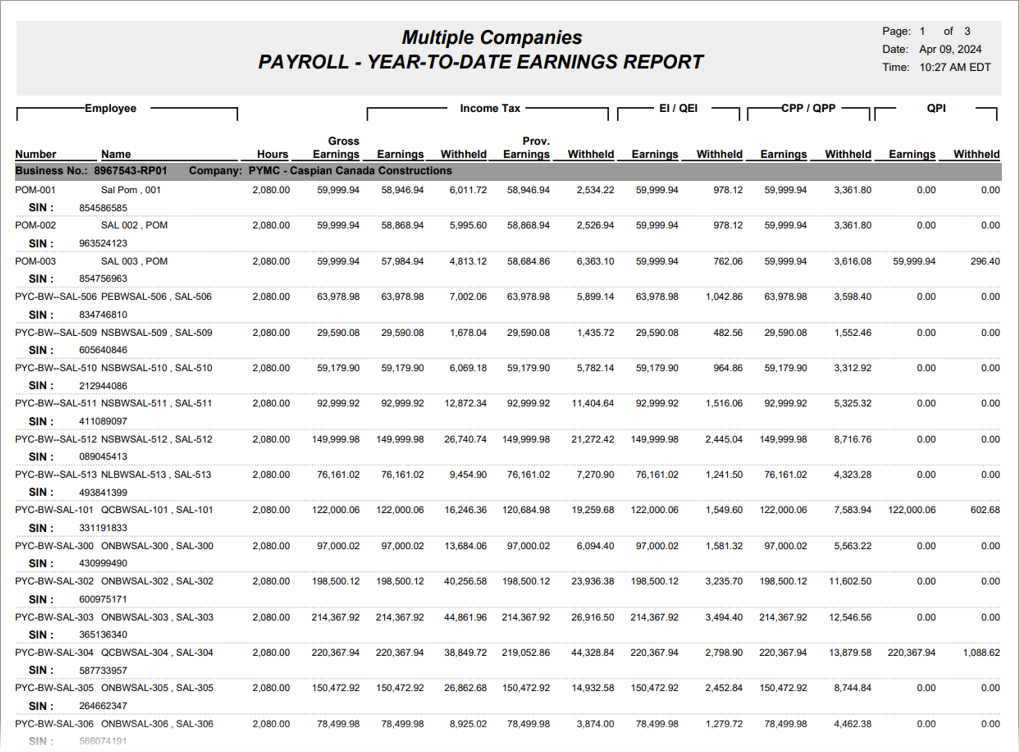
Sample Year-To-Date Earnings Report (PY1067CA)