 Search Tips
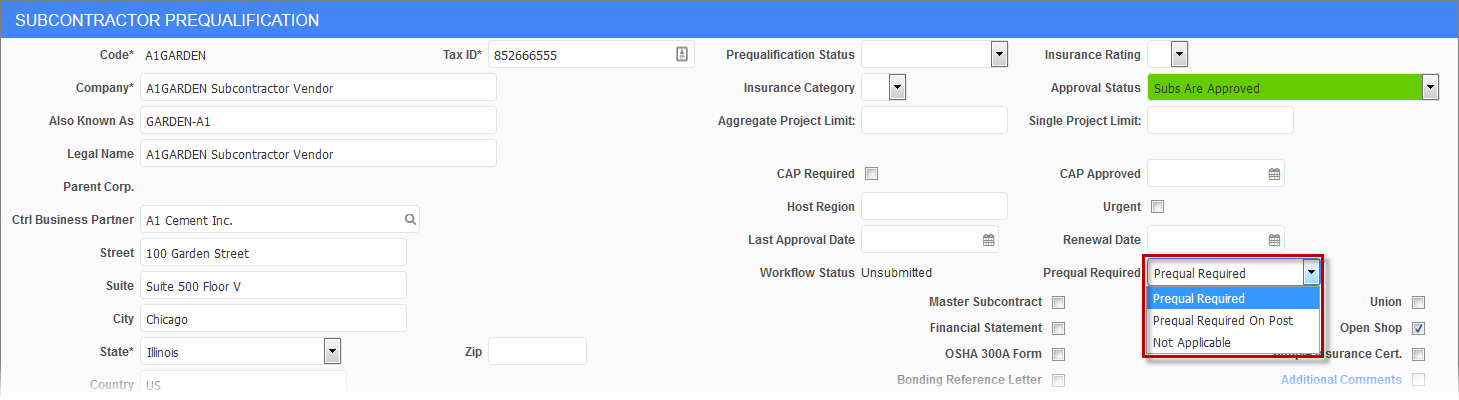
Subcontractor Prequalification; standard Treeview path: Subcontractor Prequalification > Subcontractors
The Prequal Required field, which is located on the Subcontractor Prequalification screen, is used to enroll a subcontractor in the prequalification process. This field has a drop-down menu with the following options:
-
Prequal Required: This option indicates that prequalification is required as per standard functionality. In this case, if hard stop options are used to highlight that the project or aggregate limits are being exceeded, they will continue to prevent subcontracts and change orders from being written for unqualified vendors.
The security privilege ‘SC Prequal. - Issue Contracts To Non-Qualified Vendors’ will continue to function as it did before with this option. This privilege can be granted in the Users screen in the Subcontractor Prequalification module (standard Treeview path: Subcontractor Prequalification > Security > User Access).
-
Prequal Required on Post: This option allows subcontracts and subcontract change orders to be written even if the project or aggregate limits are being exceeded, but when it is posting time, they will be re-validated for pre-qualification. This option allows users to start entering subcontracts/change orders prior to pre-qualification, with limits that are monitored through hard stops. On saving, the program treats the record as though it was monitored through limit warnings only - warning messages for the limits are displayed. However, if the user tries to post the record, the hard stop messages will be displayed.
If the security privilege ‘SC Prequal. - Issue Contracts To Non-Qualified Vendors’ is unchecked for the user when this option is in use, the subcontract or subcontract change order will still be created, but on attempting to post the record, a message will be displayed to the user informing that the vendor requires prequalification.
-
Not Applicable: This option indicates that prequalification is not required, so there are no warnings or stops when entering and saving subcontracts/change orders.