 Search Tips
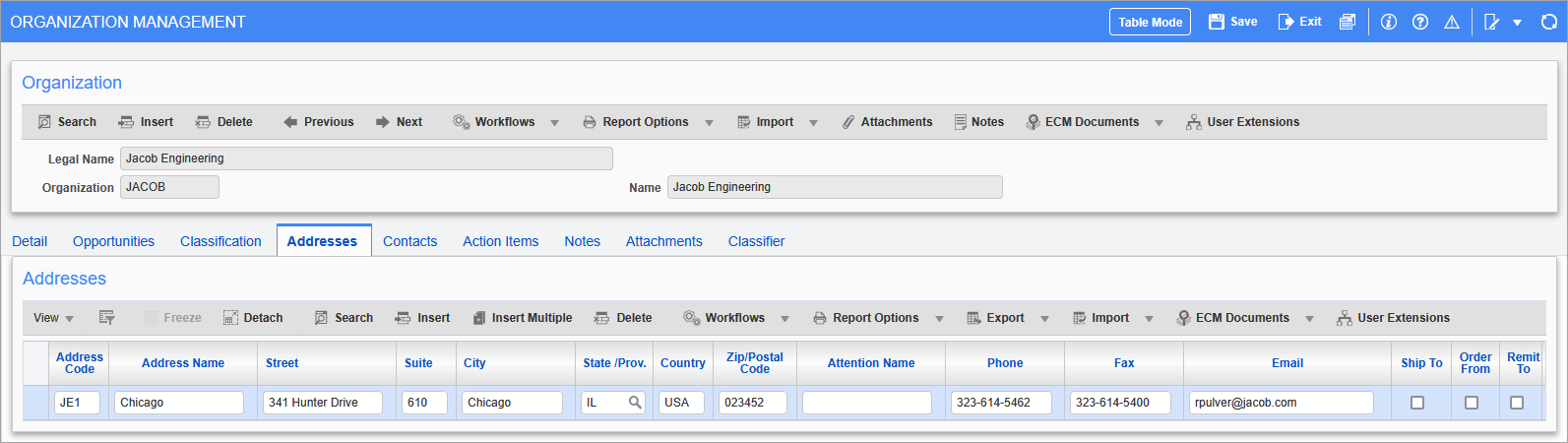
Pgm: OMORGANIZATION – Organization Management; standard Treeview path: Opportunity Management > Organizations – Addresses tab
This tab is used to create an address record, identified by a code and name. An address record created here can then be selected from a list of values when selecting a contact’s address. Also, to handle distributed organizations, which have multiple locations, this tab allows the entry of multiple addresses.
To add a new address, click the Block Toolbar’s [Insert] button, and enter its information. When finished, click the Main Toolbar’s [Save] button.
The following are descriptions for the non-standard fields on this screen.
Address Code
Code to identify particular address of a distributed organization.
Address Name
Name of address record.
Attention Name
Name of person receiving mail/shipment.
Ship To – Checkbox
Indicates if this is the ship to address.
Order From – Checkbox
Indicates if this is the order from address.
Remit To – Checkbox
Indicates if this is the remit to address.
When the system option checkbox ‘Secure Business Partner Remit-To Address’ is checked on the Global tab of the System Options screen in the System Data module (standard Treeview path: System > Setup > System Options – Global tab), remit-to addresses become protected and only users with the privilege ‘EDREMITADD – Allow Edit of Secured Remit-To Address’ will be able to edit them, including checking on and off the ‘Remit-To’ checkbox itself.
NOTE: The users without this privilege are still able to edit business partner alternate addresses that do not have the ‘Remit-To’ box checked, though they cannot edit the ‘Remit-To’ checkbox.
Also, users without this privilege can create new business partner alternate addresses (where they did not exist). In this case, the ‘Remit-To’ checkbox (either checked or unchecked during the address creation) will become protected (disabled) immediately upon saving the record.
Bill To – Checkbox
Indicates if this is the bill to address.
Primary Address – Checkbox
Checkbox indicating if address is the organization’s primary address.
Active – Checkbox
Indicates if address is active/current.