 Search Tips
Why is it Useful?
We’ve introduced a powerful Export feature to the Construct PM app, providing seamless access to comprehensive server-side data. This enhancement aligns with functionality previously available on JSP and delivers a robust export option for filtered items. Currently, export capabilities are available for Drawings, Documents, Daily Journals, Punch list items, and RFIs. This enhancement will be completed for Checklists in Patch 22.
This new feature is beneficial for several reasons:
-
Comprehensive Data Retrieval: Ensures exported files include all relevant data directly from the server, avoiding limitations of local-only exports.
-
Customer-Driven: Responds to multiple customer requests in the UserVoice, bringing a highly valued JSP feature to Construct PM.
NOTE: This feature is being released in Patch 21 (CF-15000). It is available for web.
How Does it Work?
The export relies on a web service call to retrieve filtered items from the server, ensuring all relevant data is included. The process outputs a CSV file containing all items that meet the current filters applied on the log screen.
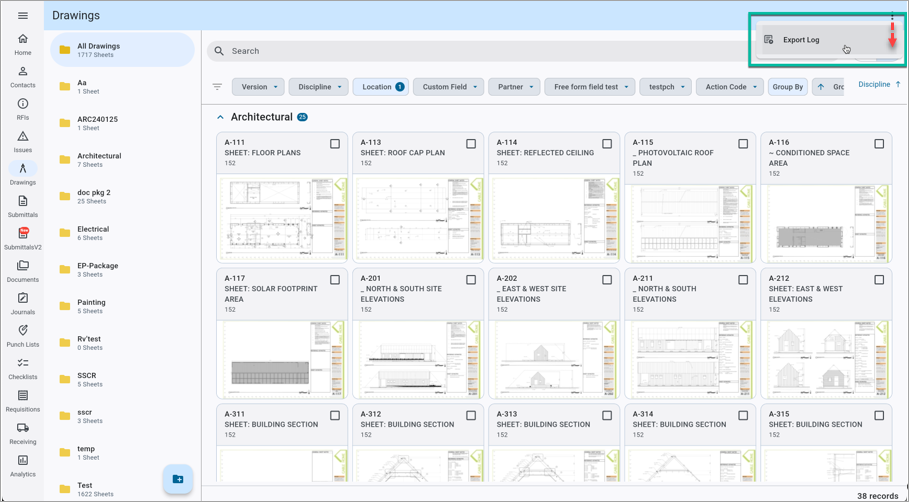
Construct PM - Sample of Drawings Log
Navigate to the desired Construct PM log screen. Click the Options menu (three dots) and select "Export Log" from the drop-down menu. A dialog will appear to confirm the export and initiate the process.
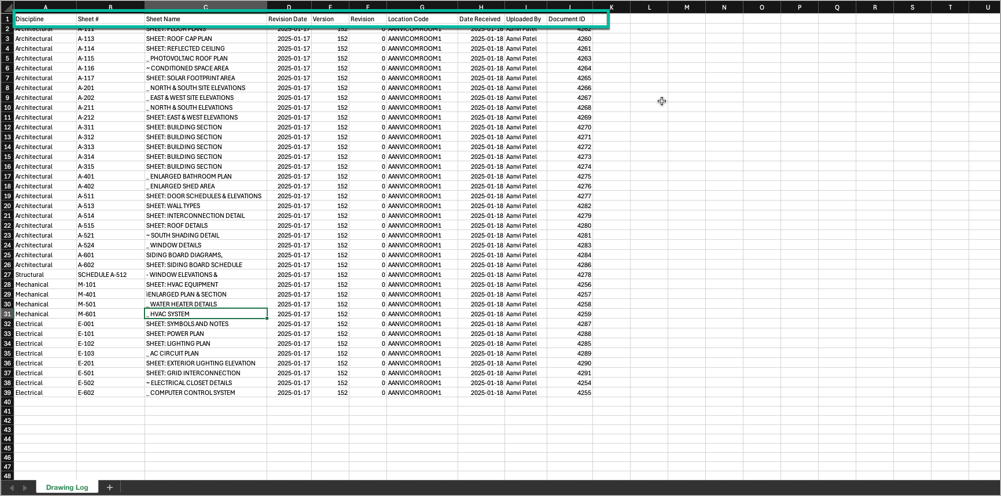
Construct PM - Sample of Drawings Export Log
A CSV file is generated which contains all items that meet the current filters applied on the log screen.
Key Considerations
UDFs and custom fields are not included in the export file for this release but will be addressed in future updates. This feature lays the groundwork for quick implementation across other modules in upcoming patches. For more details, refer to JSP Logs - Export Current and Export to MIP Template Options.
To learn more about some of the latest features released in this patch, return to Patch 21 Highlights.