 Search Tips
Why is it Useful?
This update enhances the clarity and flexibility of gauge and number visualizations, making them more effective for diverse use cases. By enabling the display of currency and custom number formatting, users can present data in ways that align with their specific business context. Whether it's choosing the appropriate number of decimal points for precision or showing financial metrics in the correct currency, these options help ensure that key insights are communicated accurately and professionally, improving decision-making and user experience.
NOTE: This feature is being released in Patch 21 (BI-804).
How Does it Work?
To use the new formatting options, start by selecting a gauge or number visualization in BI Dashboard Builder. Then, open the formatting properties by clicking the paintbrush icon. In the formatting panel, locate the "Callout Value" drop-down and expand it. From here, you can customize the callout value to suit your needs by enabling currency display, selecting the appropriate currency type, and configuring custom number formatting options. All updates are applied instantly, making it easy to fine-tune your visualization for maximum clarity and impact.
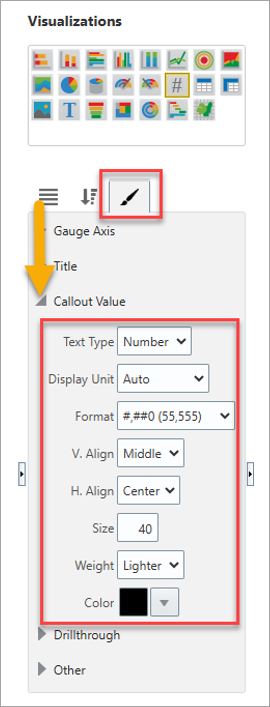
Visualization Properties for Gauge & Number Visualization Callout Value
To learn more about some of the latest features released in this patch, return to Patch 21 Highlights.