 Search Tips
Why is it Useful?
Users can easily navigate to an account's transaction details by clicking on the account amount within a cell. This feature allows users to view the individual transactions that contribute to the total amount displayed. It is particularly beneficial for users who need to review and verify the data behind the totals in the financial report, ensuring accuracy and transparency in financial analysis.
NOTE: This feature is being released in Patch 20.
How Does it Work?
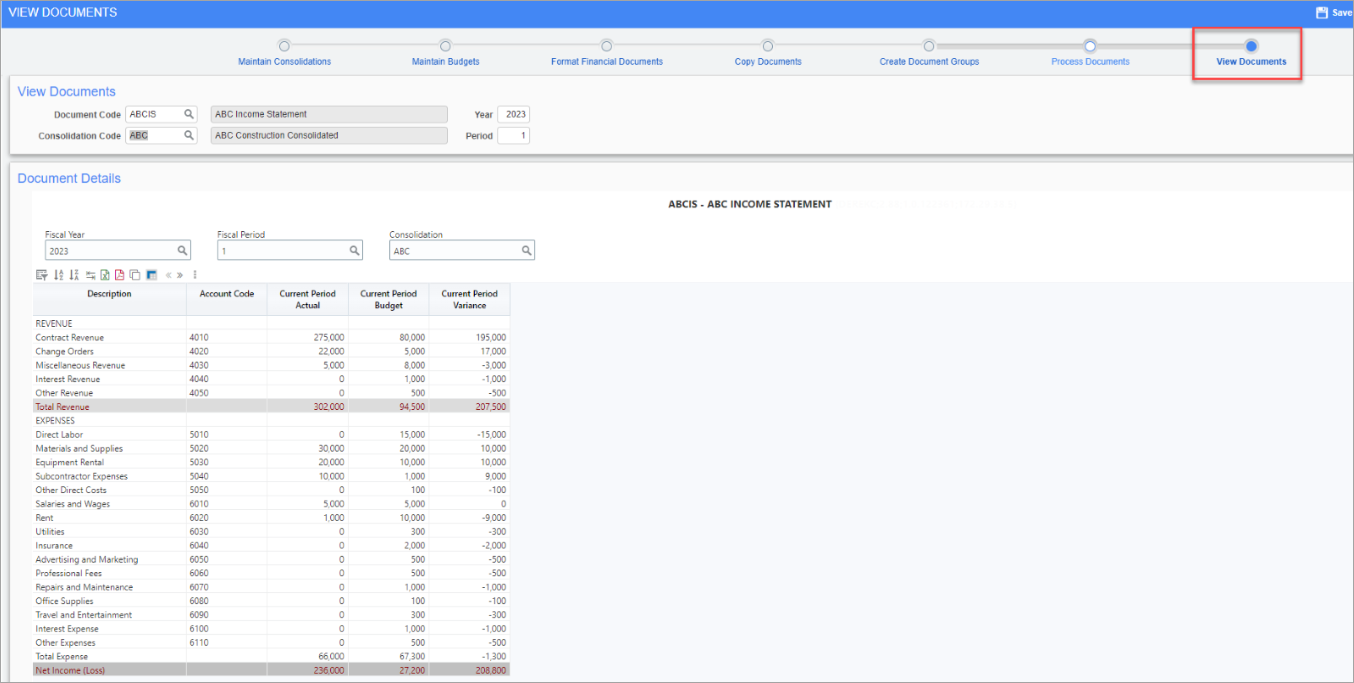
Pgm: DOCVIEW – View Documents; standard Treeview path: General Ledger > Reports > Financial Document Formatter 2.0 – View Documents node
Users of Financial Document Formatter (FDF) need to create an FDF document and proceed to the View Documents node (Last stop of the process train).
On this screen, users can double-click on an amount in an account row definition. This action opens a new view displaying the transactional details of the total amount that was clicked on, providing a clear and detailed breakdown of the account's transactions.
The account transactional details will show the standard default view which consists of:
-
Company Code
-
Company Name
-
Department Code
-
Department Name
-
Account Code
-
Account Name
-
Post Date
-
Debit Amount
-
Credit Amount
-
Amount
-
Source Code
-
Source Description
-
Reference Code
-
Reference Description
-
Journal Code
-
Batch Number
-
DSRC Code
NOTE Additionally, users can take a copy of the column view in BI Analytics and modify the columns and sort order depending on their own personal preferences.
Watch this video for a quick demonstration on how the drill-down functionality works in FDF. In this video, the user is clicking on account rows and drilling down to the transactional level details.
To learn more about some of the latest features released in this patch, return to Patch 20 Highlights.