 Search Tips
Why is it Useful?
CMiC has added the ability for users to see controlling jobs in the Cost Status Query for different companies or the same company. This is useful because companies that use different controlling jobs to track self-perform work on a project will now have a single comprehensive view within the Cost Status Query.
NOTE: This feature was released in Patch 14-2 under Issue 20.21126. Only the Beta version has been released for this patch. Some of the features are still under development.
How Does it Work?
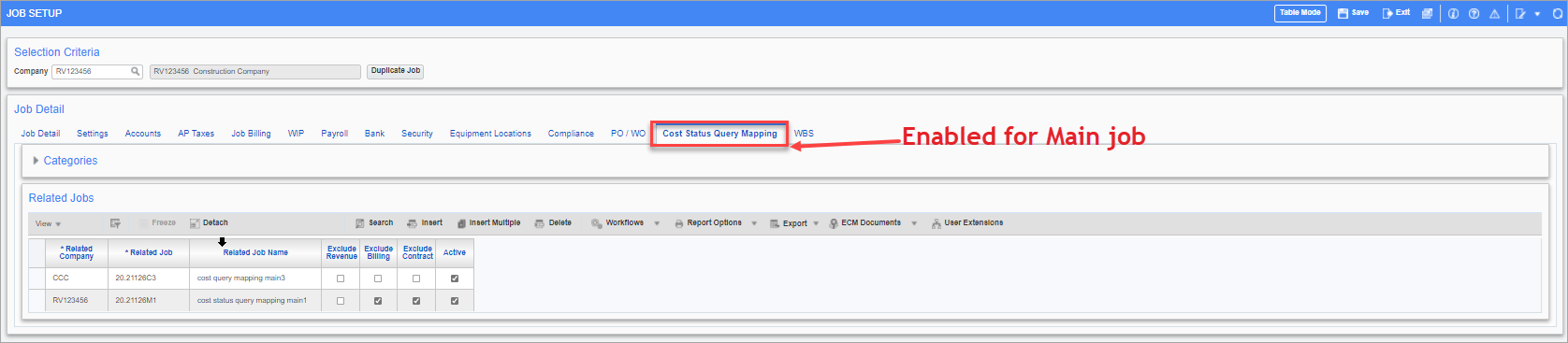
Pgm: JCJOBFM – Job Setup; standard Treeview path: Job Costing > Job > Enter Job
A new tab has been added to the Job Setup screen called "Cost Status Query Mapping". This tab allows users to link one or more main controlling jobs either from the same company or from a different company. Once the jobs are linked, users can see all the linked jobs and their sub-jobs under the Cost Status Query/Cost Status Query (Category) or other similar reports to get an accurate view of a project along with the cost/budget details.
To learn more about how this feature works, refer to Job Costing - Using Self Perform View.