 Search Tips
Why is it Useful?
CMiC has added the ability to restart a review cycle, clearing the reviewer's table and allowing the review process to begin anew. This feature provides users with the flexibility of restarting the review process to address any issues with the current review cycle.
NOTE: This feature was released in Patch 14-2 under Issue 21.44326.
How Does it Work?
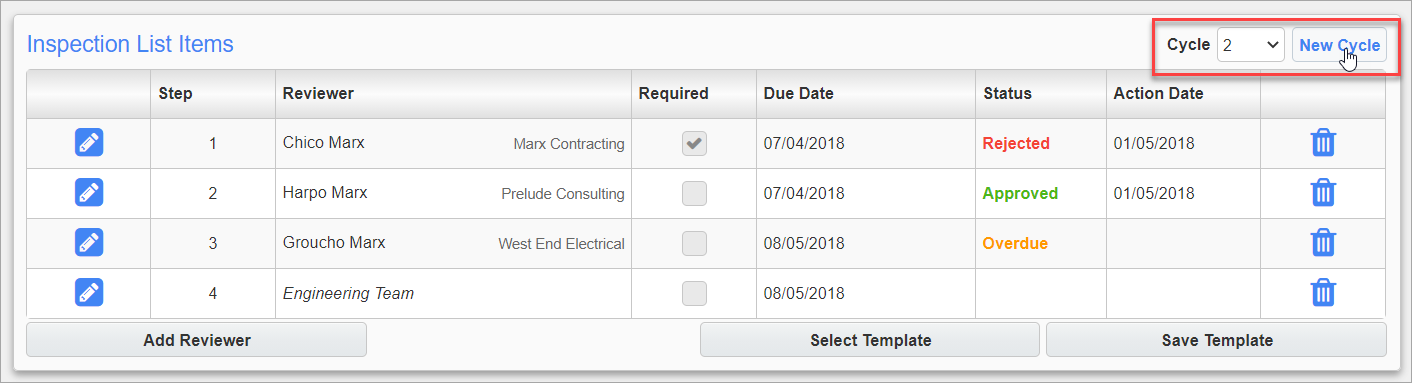
Example of Reviewer's Table
For this enhancement, a Cycle field and [New Cycle] button have been added to the Reviewers Table. Click the [New Cycle] button to create a new review cycle with the same set of reviewers but with new due dates. Users can navigate between review cycles using the Cycle field's drop-down menu but can't edit any of the previous cycles.
The ability to create a new review cycle is controlled by the 'Create New Review Cycle' PM role privilege located on the Project Role screen (Standard Treeview path: CMiC Field > Security > Project Roles).
NOTE: This update only applies to RFIs and Punch List Items.