Search Tips
Why is it Useful?
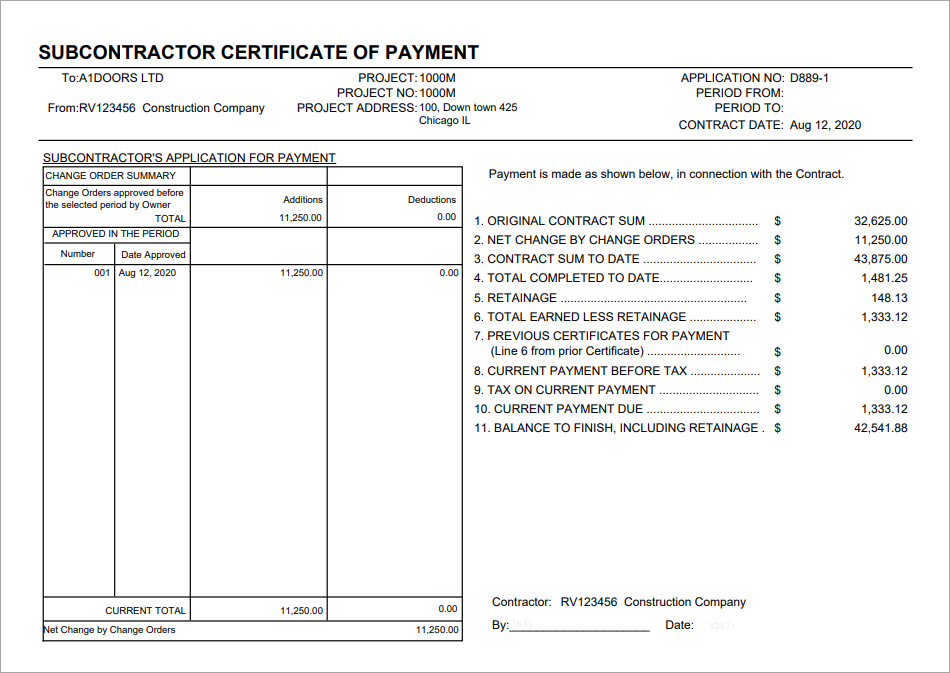
CMiC has added the ability to re-print the Certificate of Payment Report SC320 after it is posted. The certificate of payment is usually attached to the request for payment but sometimes it is forgotten, misplaced, or the customer is asking for an additional copy. Users can go back to a posted RFP and print the certificate of payment for that specific invoice to see the payment details and impact to job at that point in time.
NOTE: This feature was released in Patch 13-2 under Issue 19.90687.
How Does it Work?
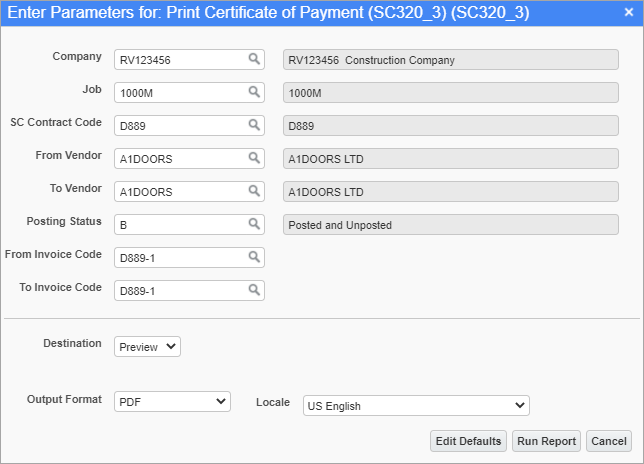
Print Certificate of Payment Report; standard Treeview path: Subcontract Management > Reports > Print Certificate of Payment - SC320_3
Use this screen to re-print a Certificate of Payment report after RFPs have been posted, if required for backup. This report, Certificate of Payment (SC320_3), is based on the Certificate of Payment (SC320) report but it runs as a standalone and does not print from the Print Certificate of Payment screen.
The Certificate of Payment (SC320_3) report will print the same columns as the Print Certificate of Payment (SC320), but the data is based on the selected invoice(s) regardless of newer invoices (RFPs).