 Search Tips
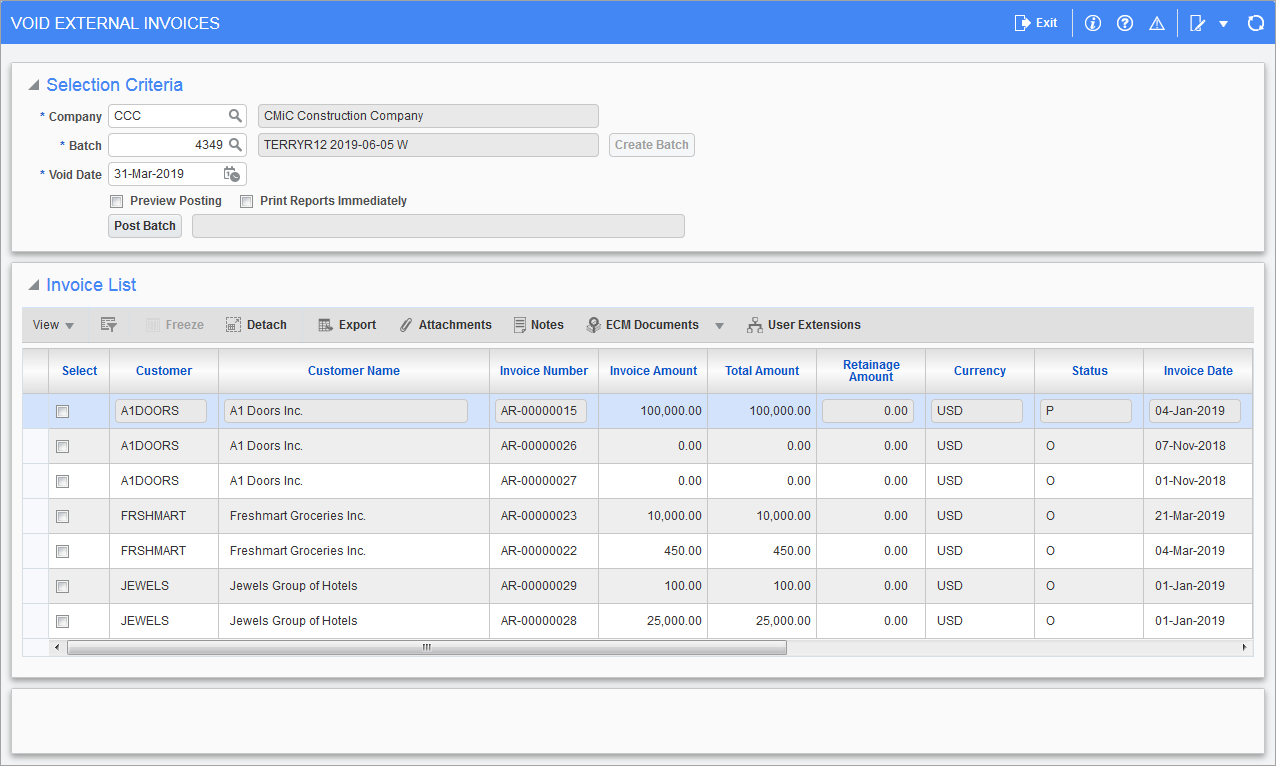
PGM: ARINVVOD – Void External Invoices; standard Treeview path: Material Sales > Utilities > Void External Billing
Once an invoice has been posted it cannot be deleted from the system, it must be voided instead. The Void External Invoice screen will reverse all of the transactions associated with the posting of the invoice from the Accounts Receivable and General Ledger module and any other sub-ledgers involved. An invoice is considered available for voiding if it has not been paid or does not have any memos or adjustments associated with it. If there have been payments received then the payments must be voided first.
A voided invoice is not removed from the system, therefore the system will not allow the invoice number to be used again.
Company, Batch
Verify the company code, then use the [Create Batch] button to make a new void invoice batch.
Void Date
This is the date for the fiscal period the debits and credits from this batch will be posted to. All invoices selected for voiding in this batch will be posted using this date. As with the standard AR posting screen, the system will default the current system date if it falls within the current AR period, otherwise it will default the last day of the current AR month.
Preview Posting – Checkbox
Check this box to preview the batch before posting it.
Print Reports Immediately – Checkbox
Check this box to print the posting report immediately after posting. If left unchecked the posting report will not print during the posting process, but can be printed at a later time using the Print Posting Reports screen.
Invoice List
The system will automatically display all invoices available for voiding. Mark the required invoices by checking the ‘Select’ checkbox next to the invoice number.
When complete use the [Void] button to start the process.
Unlike other forms, the voiding of an invoice does an immediate posting. Most of the other functions on the system require the use of the [Post Batch] button.
NOTE: Only invoices associated to the Material Sales module will be available for voiding.