 Search Tips
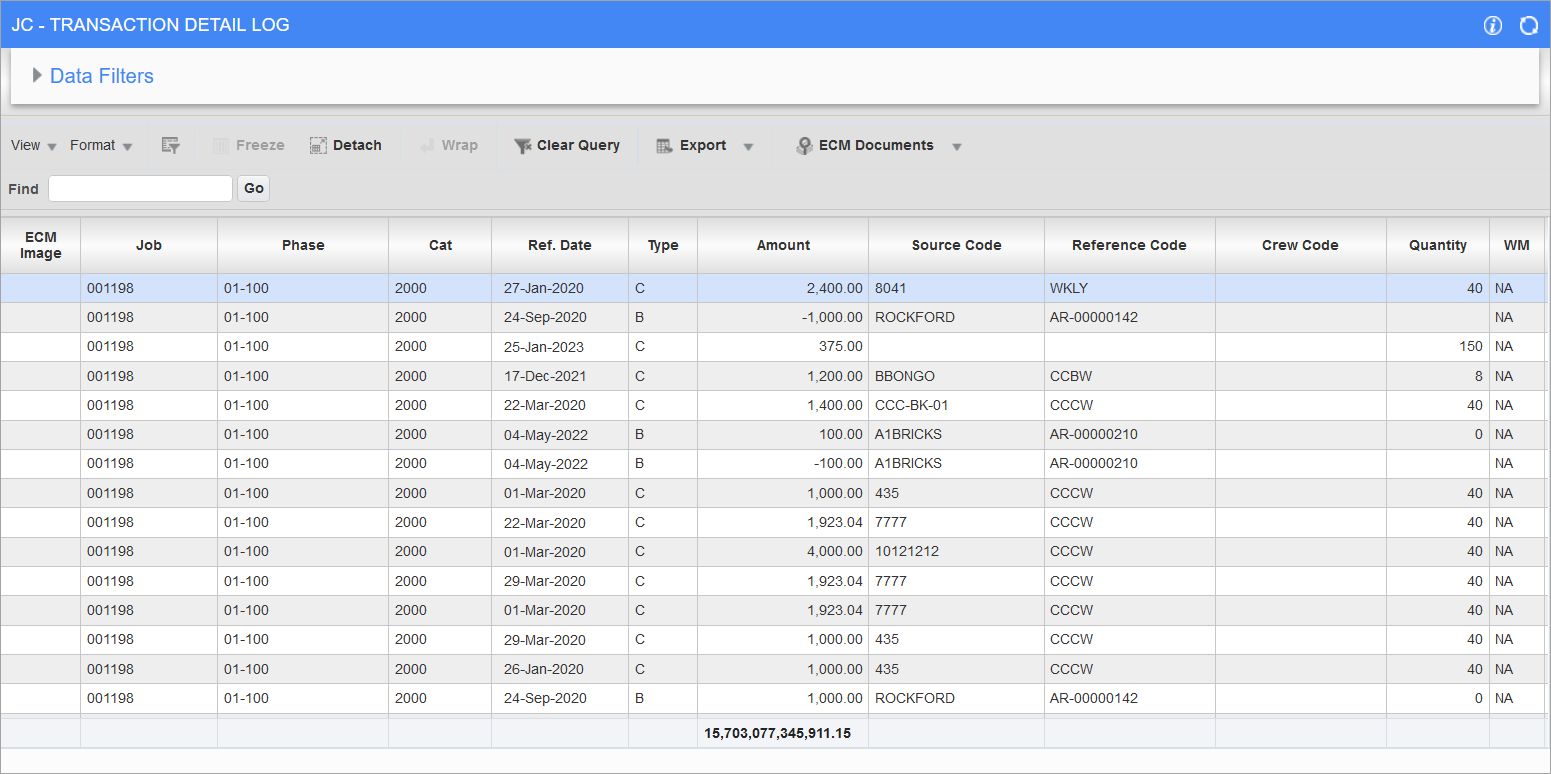
Pgm: JCDETAIL_LOG – JC – Transaction Detail Log; standard Treeview path: Job Costing > Logs > Transaction Detail
The Transaction Detail log displays posted and unposted cost code (phase)/category transactions for a job.
The column Unbilled Revenue Amount is a calculated column based on job billing rates, equipment billing rates, or payroll billing rates. The value populated under this column is used as CPR (calculated potential revenue) amount for cost type bill code lines, in Job Billing generation programs, to be generated as billing amounts.
The Unbilled Revenue column values may be updated when necessary, using the Job Billing Utility – Recalculate Billing Rates.
If the Post Burdens By field is set to "Transaction Type" and the 'Post Transaction by Hour Type in Job Cost' box is checked in Payroll Control, the labor cost transaction lines will display individual lines for each transaction type (component), as opposed to current two lines for base wage and burdens lump sum amount. Payroll timesheet posting will consider the checked 'Post Transactions by Hour Type in Job Cost' box and will post and split the transactions by hour type in the JC Transaction Detail Log screen: NWHR, OVHR (OT), DTHR (DOT), OTHR (Other Hours), and Expense.
NOTE: For burden types, the JCDT_AMT will be used for calculation of the unbilled revenue amount. The Payroll’s Final Posting screen will post individual lines in the JCDETAIL table for both costs and burden amounts.
If on the Payroll Control screen, the Job Summary By field is set to "Timesheet", the 'Post Transactions by Hour Type in Job Cost' checkbox is checked, and the Post Burdens By field is set to "Transaction Type and Code", then the JC Transaction Detail log will include Payroll data for the following columns:
PY Tran Code
Stores the Payroll transaction code.
PY Tran Code Description
Stores a short description of the transaction code.
PY Tran Type
Stores the Payroll transaction type, such as BW, BN, TX, etc.
PY Tran Type Description
Stores the Payroll transaction type description.
PY Wage Rate Code
Stores the Payroll wage rate code.
Customizing Display
As shown in the screenshot, hover over a column header to bring up arrows to sort the column in ascending or descending order. Also, columns can be dragged and dropped to different positions, and resized. The following descibes the columns available on the Transaction Detail log.
Type
This column indicates what type of transaction the record is.
-
"C" types are for cost transactions. Examples include cost transactions, SC RFP invoice postings, Payroll postings, etc.
-
"O" types are for commitments. Examples include subcontract commitment postings.
-
"B" types are for billing transactions. Examples include transactions pulled into billing amounts.
This column is very useful for tracking down transactions which are posted using their respective screens.