 Search Tips
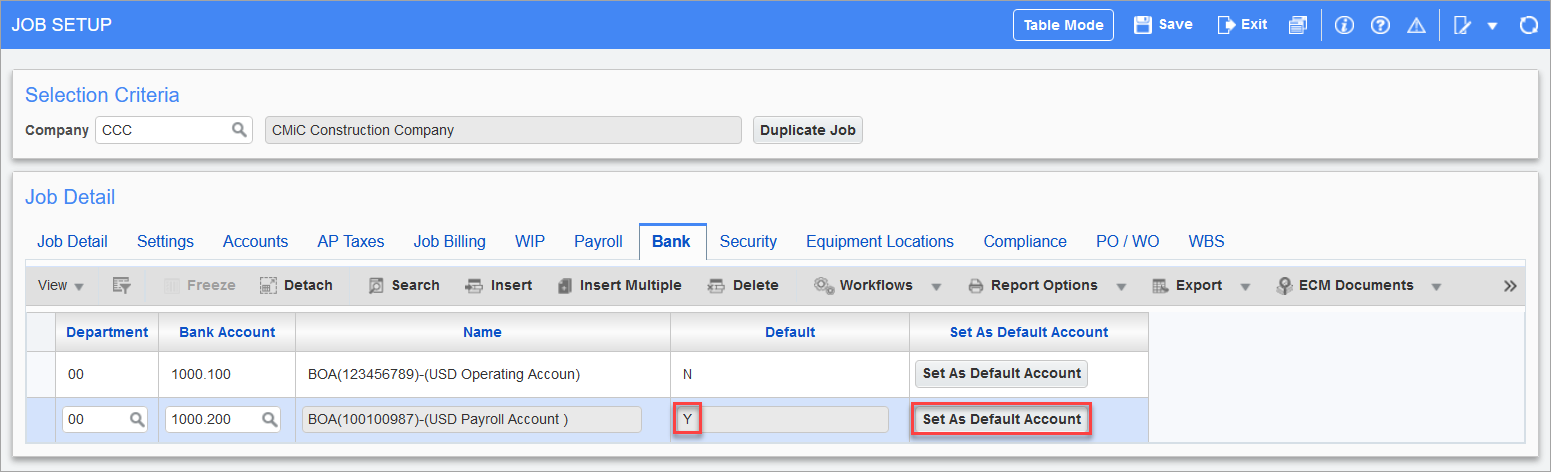
Pgm: JCJOBFM – Job Setup; standard Treeview path: Job Costing > Job > Enter Job – Bank tab
This tab is used to implement the job bank account feature for the creation of vouchers and RFPs.
This feature is available in both the Accounts Payable (AP) and Subcontract Management (SC) modules:
-
In AP, it is activated using the 'Use Bank Accounts By Job' checkbox on the Voucher tab of the AP Control File Options screen (standard Treeview path: Accounts Payable > Setup > Local Tables > Control File Options).
-
In SC, it is activated via the 'Use Bank Accounts By Job' checkbox on the RFP Defaults tab of the SC Control screen (standard Treeview path: Subcontract Management > Local Tables > Control).
Normally, when creating vouchers or RFPs (Request for Payment), the system will use the default cash accounts set up for the vendors. If this feature is activated, when creating a voucher, the system uses the default cash account set up for the job via this tab instead of the default cash account set up for the vendor. If a job does not have its default account set up, the system will report an error, such as the one below, and require that its default account be set up in order to finish creating the voucher.

More than one bank account can be entered via this tab, but one of them must be set as the default via the [Set As Default Account] button. The other entered accounts will be available in the account LOVs for vouchers and RPFs.
NOTE: If vouchers or subcontracts are to be created combining jobs and sub-jobs, then the same taxes and bank accounts must be setup identically on the related jobs.
Change Default Bank Account
A bank account that is set as the default cannot be changed, so, to change it, insert a new row and enter the details for the new account. Then, click the new row’s [Set As Default Account] button to set the new account as the default. Since the old account is no longer the default, it can be deleted.