 Search Tips
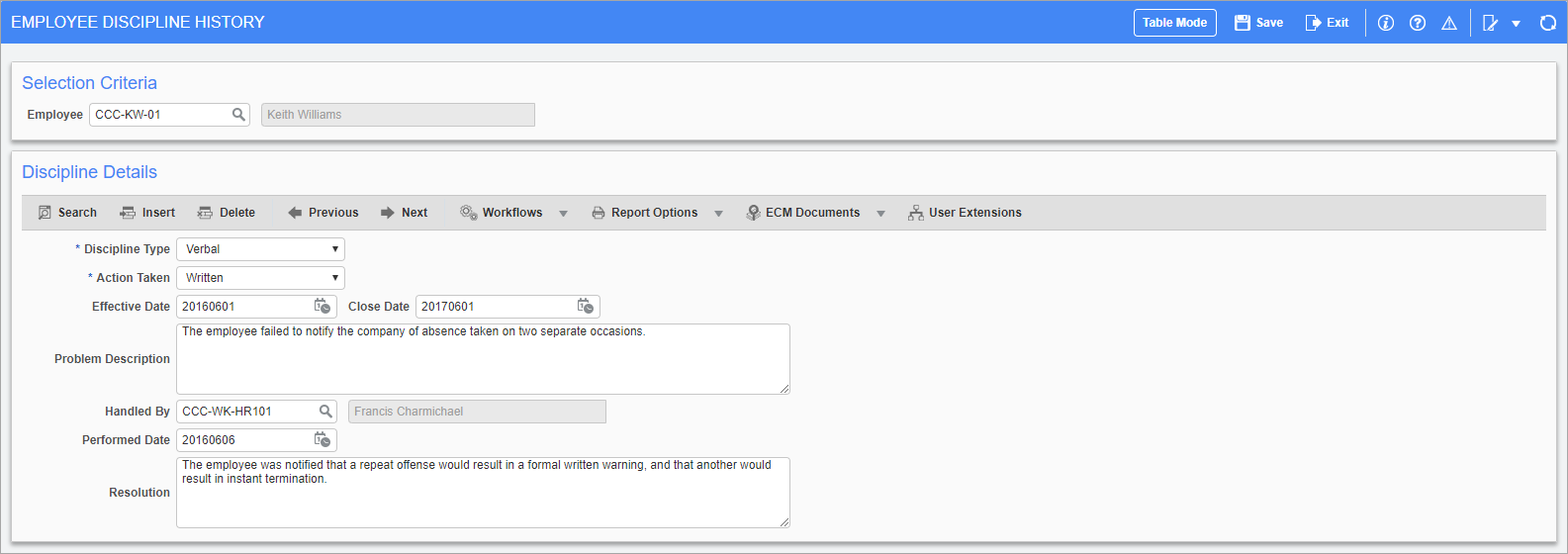
Pgm: HRDISCIPLN – Employee Discipline History; standard Treeview path: Human Resources > Personnel > Discipline Tracking
This screen is used for tracking disciplinary action taken against an employee.
NOTE: Information entered into this screen does not appear on any reports within the Human Resources module and is used for entry and query purposes only.
Discipline Type
Select whether the discipline was delivered verbally or in writing.
Action Taken
Select whether the employee was issued a written warning, sent home without pay, or terminated.
Effective Date, Close Date
Enter/select the date the problem was filed and the discipline took effect. The close date should be calculated as one year from the effective date.
Problem Description
Enter the nature of the infraction committed by the employee.
Handled By
Enter/select the employee in charge of taking disciplinary action.
Performed Date
Enter/select the date the disciplinary measures were performed on or by the employee.
Resolution
Enter the specific action taken against the offending employee and any details about what further action may be taken against repeat offences.