 Search Tips
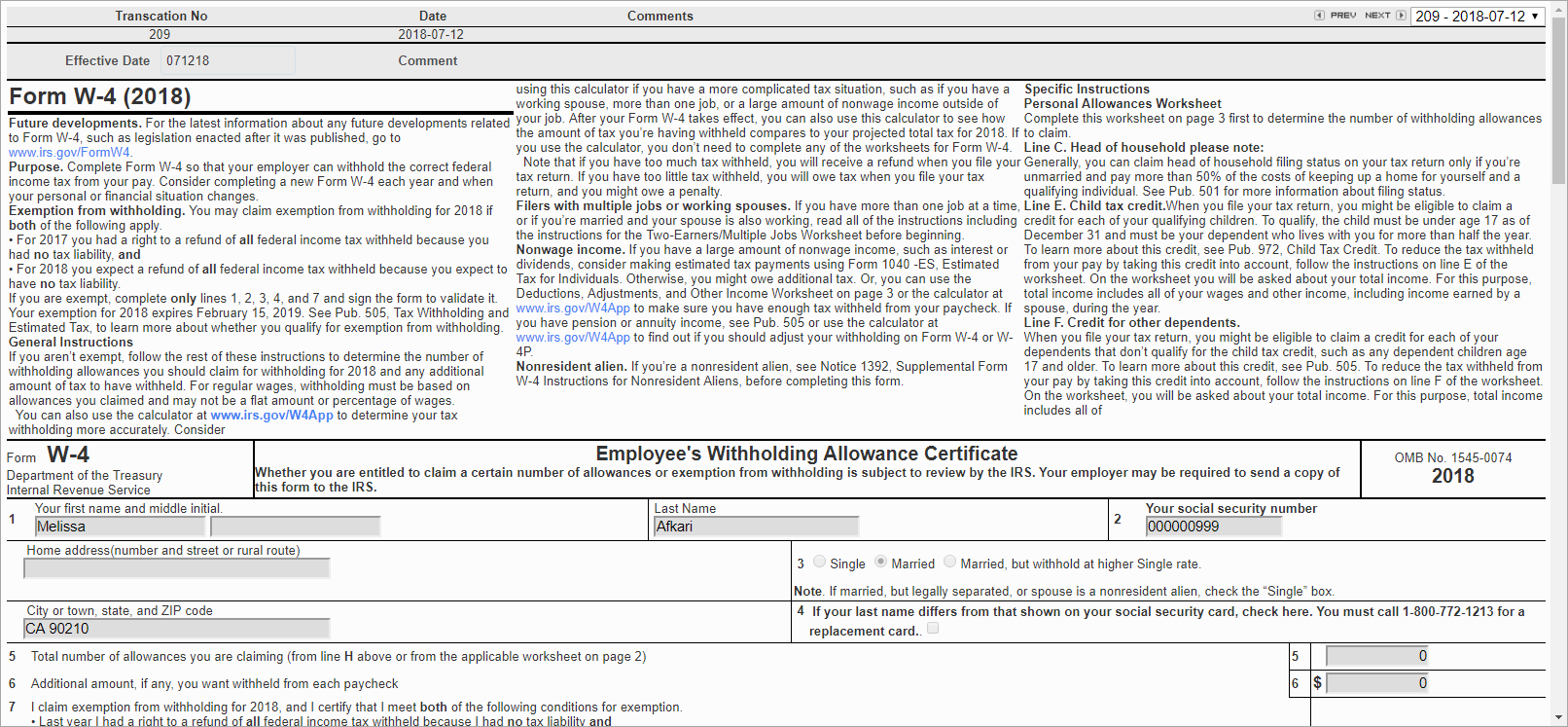
W-4 Information; standard Treeview path: Employee Self Service > Personal Information > W-4 Information
Employees can submit changes to their W-4 forms for approval in the W-4 Information screen. Changes may be made in the original record if there are no W-4 requests to approve for the employee.
Any changes should be made and saved in the original W-4 form. When a change is saved, a new record with the transaction number and current date is created and the original record can no longer be edited. Line 3 must be specified. Lines 5 and 6 may also be entered. Once approved, the Employee Profile is updated with lines 3, 5, and 6; an employment history record is created in the US Payroll module; and the original W-4 can be edited again.
The Federal Filing Status field on the Tax tab of the Employee Profile is updated with the value in line 3 of the W-4. The Primary Exemptions field on the Tax tab of the Employee Profile is updated with line 5 of the W-4. Federal withholding tax is inserted in the Overrides pop-up screen on the Tax tab of the Employee Profile with the value entered in line 6 of the W-4. The tax amount is the value from line 6 and the amount type will be “00” (Additional Tax).
To delete a saved W-4, press the [Delete] button. When this record is deleted, the original W-4 form can be edited and submitted.
To submit a modified W-4 for approval, press the [Submit] button. Once submitted, the W-4 can be approved in the Personal Information Change Request Approval screen.