 Search Tips
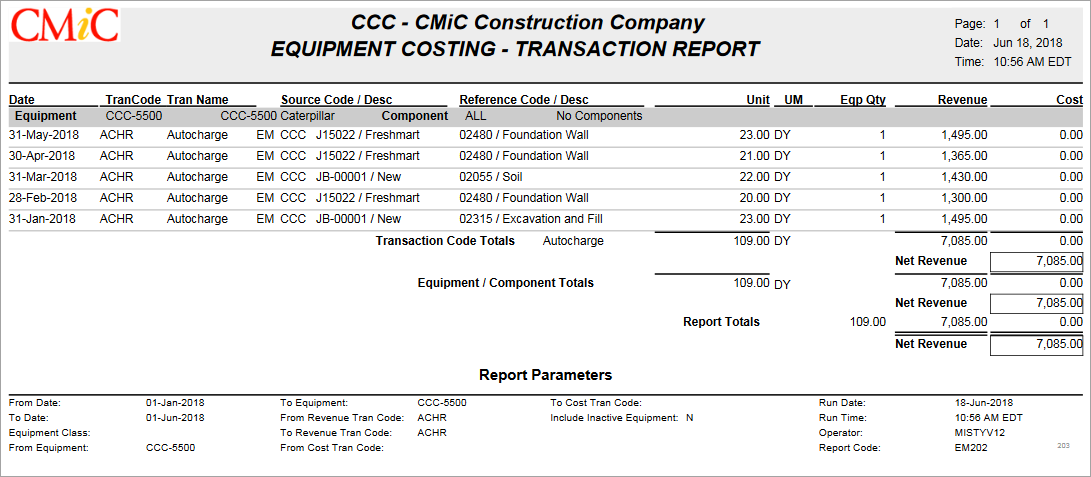
Example of Equipment Costing – Transaction Report
This equipment costing report provides detailed information on equipment transactions.
Run Report
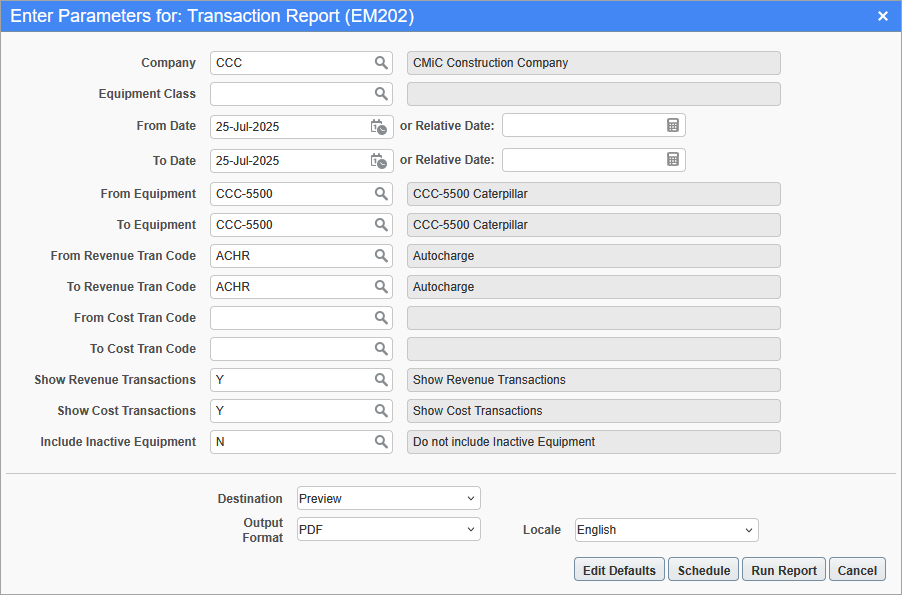
Printing Options screen for Transaction Report (EM202)
To run the report, select the desired report parameters through the Printing Options screen, as shown above, and click [Run Report].
The following table provides details about the parameters used to generate this report:
| Parameter | Description |
|---|---|
|
Company |
Company code; defaults to user’s default Company. |
|
Equipment Class |
Enter Equipment Class Code or leave blank to indicate “All”. |
|
From Date |
Date to start including transactions. |
|
To Date |
Date to end including transactions. |
|
From Equipment |
Optional; if left blank, taken to be first equipment item, by code. Specifies which equipment item to start with, by Equipment Code. |
|
To Equipment |
Optional; if left blank, taken to be last equipment item, by code. Specifies which equipment item to end with, by Equipment Code. |
|
From Revenue Tran Code |
Optional; if left blank, taken to be first revenue transaction, by code. Specifies which revenue transaction to start with, by Revenue Transaction Code. |
|
To Revenue Tran Code |
Optional; if left blank, taken to be last revenue transaction, by code. Specifies which revenue transaction to end with, by Revenue Transaction Code. |
|
From Cost Tran Code |
Optional; if left blank, taken to be first cost transaction, by code. Specifies which cost transaction to start with, by Cost Transaction Code. |
|
To Cost Tran Code |
Optional; if left blank, taken to be last cost transaction, by code. Specifies which cost transaction to end with, by Cost Transaction Code. |
|
Show Revenue Transactions |
Select whether or not to include revenue transactions in the report. |
|
Show Cost Transactions |
Select whether or not to include cost transactions in the report. |
|
Include Inactive Equipment |
Select whether or not to include inactive equipment in the report. |