 Search Tips
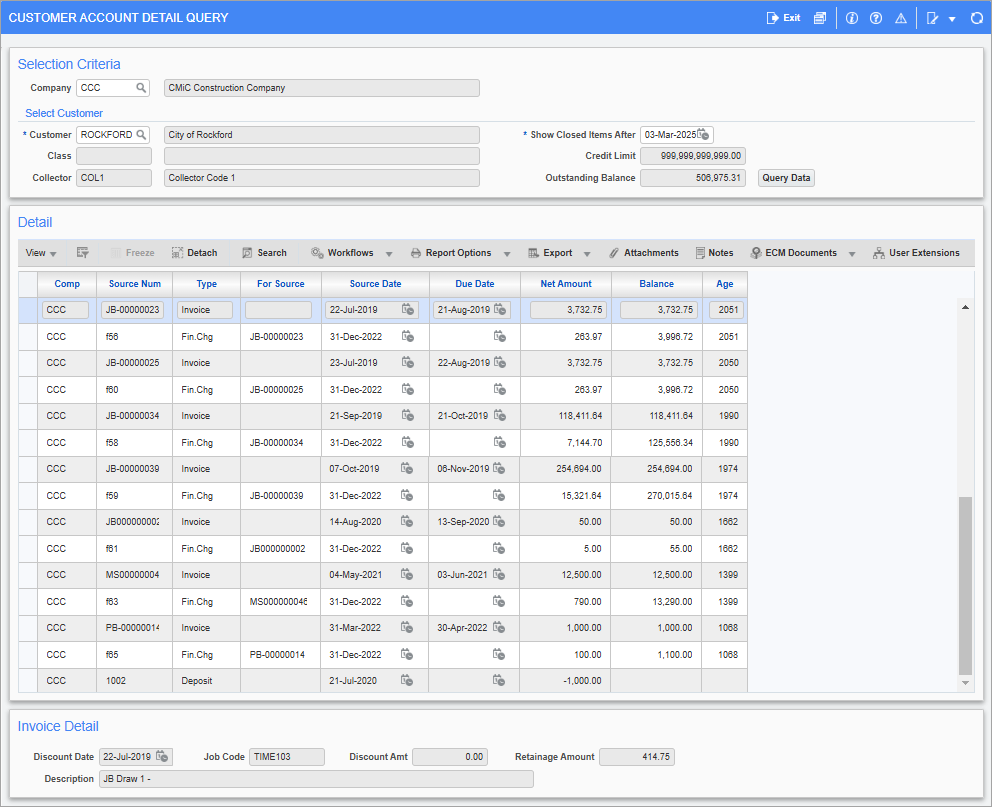
Pgm: ARACCQRY – Customer Account Detail Query; standard Treeview path: Accounts Receivable > Queries > Customer Account Detail Query
The Accounts Receivable Customer Account Detail Query screen displays detailed information about each customer account. The first section is used to query customers by customer code, class code, collector code, credit limit, and balance owing. The second section displays the full account activity for the selected customer.
Selection Criteria
This section’s fields are used to filter the list of customers displayed in the Detail sections.
Company
Enter/select a relevant company or leave blank to view account details for the selected customer across all companies in the system.
Select Customer
Customer
Enter/select a customer code.
Class, Collector, Credit Limit, Outstanding Balance
These read-only fields display the class code, collector code, credit limit, and outstanding balance owing for the selected customer.
Show Closed Items After
Enter/select a date. Details will be shown only for closed item dates which are on or after this date.
Query Data
Press this button to run the query. If one of the parameters is changed, click this button again to refresh the list.
Detail
This section displays the full account activity for the selected customer.
NOTE All activities are displayed in this section with the activity type shown on each item. It is not possible to restrict the type of activity displayed or queried in this screen.
Invoice Detail
This section displays the invoice details for the selected invoice in the Detail section. This includes discount date, job code, discount amount, retainage amount, and description.