 Search Tips
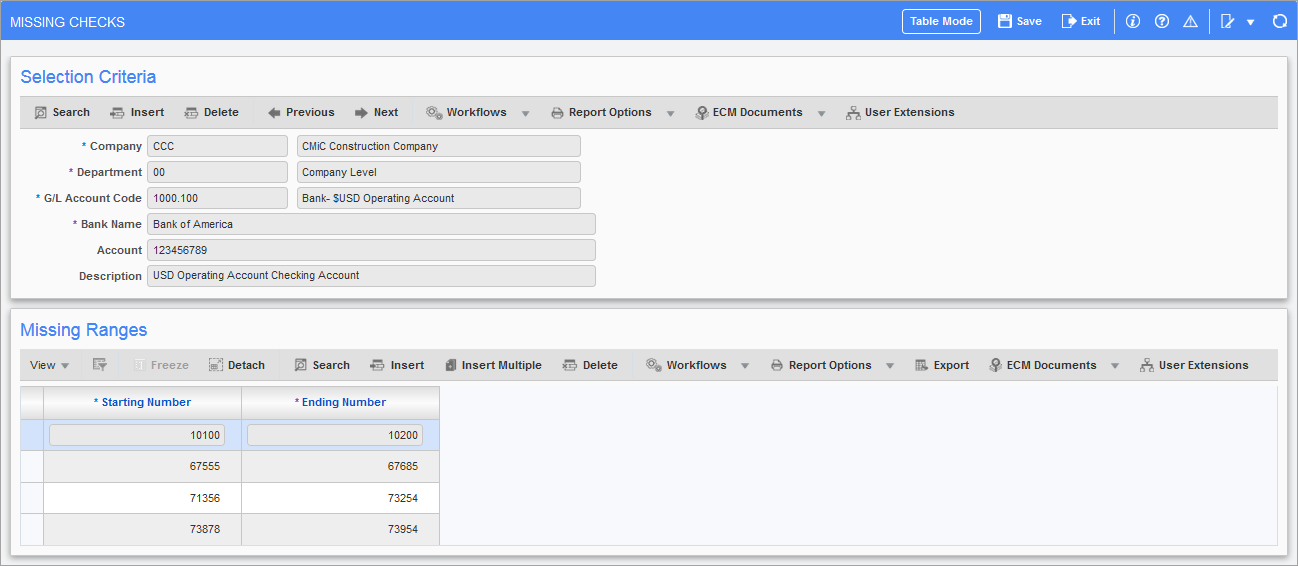
Pgm: BANKMCHQ – Missing Checks; standard Treeview path: Accounts Payable > Utilities > Missing Checks
This screen is used to establish the numerical sequence of the pre-printed check numbers for a company account, by defining the sequence of numbers to bypass during the check printing process.
For example, an order is placed to a supplier for box of 1,000 checks having the check number sequence begin at "00001". The supplier delivers the 1,000 checks with the sequence of the check numbers divided. The check number sequence begins with "00001" and check numbers "00100" to "00300" are missing. Therefore, the last check number in the series of checks received from the supplier is "01300". If the check numbers "00100" to "00300" are not defined as missing, the system will assume the check numbers exist.
Selection Criteria
To create a new entry of missing check numbers for a company account, click the [Insert] button, fill in the details, and click [Save]. Then, use the Missing Ranges section to enter the missing check numbers.
Missing Ranges
Use this section to enter the range of check numbers missing for the bank account specified in the previous section.
To enter a range, click this section’s [Insert] button and use the new row to enter the range of check numbers to be bypassed by the system. Only those check numbers equal to or within the range will be printed on the report. If you want to bypass a single check number, enter the same number in both fields.