 Search Tips
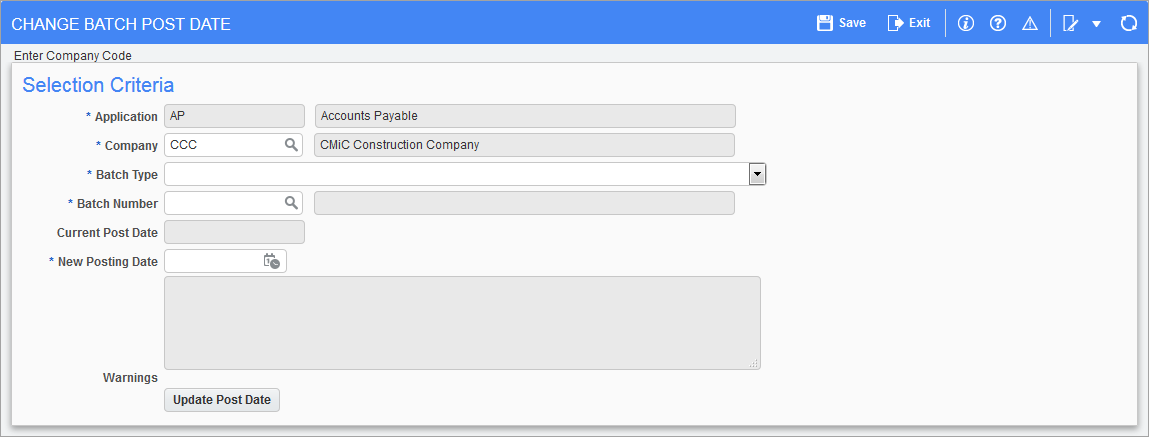
Pgm: SYS_POST_DATE_CHANGE – Change Batch Post Date; standard Treeview path: Accounts Payable > Utilities > Change Batch Post Date
This utility is available in AP, AR, JB, JC, SC, PY, PYC, CI, CM, and PRM to allow a new batch post date to be applied to a previously posted batch. This process will reverse the original posting by creating a negating transaction in all affected sub-ledgers and creating a new transaction as of the new posting date. The new batch will use the original posting batch number. Where multiple post dates within a batch are affected, the new batch will have one post date only. In Job Costing, there will be no recalculation of the projections. This screen uses a privilege which is specific for each application.
Company
Enter/select from the LOV batch company code.
Batch Type
Select from the Batch Type drop-down list the batch type that will be given a new post date. The options are “Equipment Work Item Batch Type”, “GL Work Item Batch Type”, and “Job Costing Work Item Batch Type”.
Batch Number
Enter/select from the LOV the batch number that will be given a new post date.
Current Post Date
The current posting date will display the actual posting date of the batch. The current posting date will change to the new posting date after the [Update Post Date] button has been pressed.
New Posting Date
Enter the new posting date that will be applied to the selected batch.
[Update Post Date] – Button
Press the [Update Post Date] button to apply a new post date to the batch. The original transaction will be marked with the change date (system date) as will the reversing entry. The new transaction will show the post date with the new post date and the change date as null leaving the transaction available for the post date to be changed again, if required. General rules will be followed, i.e. not posting to a closed GL, JC, or equipment period.
NOTE: Updating the batch post date also updates the post date of the records within the batch.